The goal of this document is not to give a detailed explanation of clustering, but to describe how Exact Globe works in a clustered SQL Server environment. This document handles clustering with any Microsoft SQL Server Edition that supports clustering.
What is clustering:
A cluster is a group of independent computers that work together to run a common set of applications and to provide the image of a single system to the client and the application. There are a number of things you have to keep in mind when using clustering:
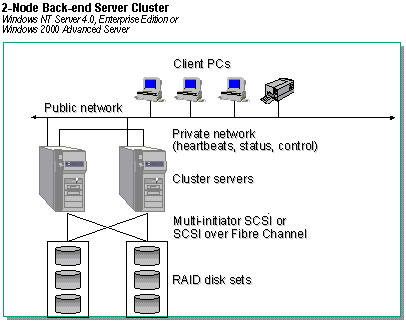
- In a clustered environment, there are two or more physical servers that are linked to an external storage device;
- On the physical servers only the operating system files are located, the data files and the program files of SQL Server are located on the external storage;
- When installing SQL Server a virtual server is created and when connecting to SQL Server you connect to the virtual server and not to one of the physical servers;
- In a clustered environment a server is called a node;
- Clustering is only supported in specific versions of Microsoft SQL Server;
- SQL Server does not support load balancing.
What is the goal of clustering:
The goal of clustering is to minimize the amount of downtime in case of hardware failures and to maximize the availability of the files stored in the cluster. A cluster is not meant to increase performance. As a result of this an important part of clustering is failover support.
What is failover clustering:
Since a cluster consists of multiple nodes, there is always a risk that a node fails. Just like in a non clustered environment, where your server might crash due to hardware failures. In that case the other node(s) will take over within seconds and the downtime is minimized. This we call a failover. In case a failover occurs, the SQL Server and its related services will go offline for a short moment and come back online again automatically. For this period of time the connection between applications and SQL Server (in this case) is lost. In order for an application to be able to continue without being restarted it needs to be able to automatically reconnect if the connection is lost. No matter if an application can automatically reconnect (like the Query analyzer) or not, in case a failover occurs, all changes that are part of an open transaction are lost. A failover only has influence on open transactions and because the transaction fails, SQL Server will automatically rollback the transaction (undo the changes). This means that all changes that are being made within the transaction are lost. A failover has no consequences for committed transactions or transactions for which a rollback occurred, before the failover occurred.
Does Exact Globe support clustering and failover clustering:
Exact Globe can be installed in a clustered environment, but it is not capable of handling a failover. Exact Globe needs a constant, stable connection to the SQL Server and any interruption in this connection will lead to Exact Globe loosing the connection. In Exact Globe you will notice this by menu paths and buttons not to respond any more or by message like “Communication link failure”. This means you have to close Exact Globe and start it again in order to continue working.
Picture of a clustered environment. The Cluster servers, RAID disk sets and the SCSI devices are part of the cluster. The public network and client pc’s are not.