The Exact System Information Tool (ESI)
This System Info tool is developed to easily retrieve and adjust Windows, SQL and Database settings to get an optimum performance.
It will also automatically send statistical information about Exact tables and index usage to Exact.
For this tool to function proper, you need run this tool on the SQL Server using an administrator or equivalent Windows account.
Download the lastest version from the following FTP site:
ftp://ftp.exact.nl/Software/ESI/ExactSysInfo.zip
How to use the tool:
Startup Parameter:
/AUTO when you start the application with this parameter, it will execute the tool, upload the information and close the tool. This can be used to schedule the ESI tool.
Step 1: Start and Connect
To start the application you need to execute the ExactSysInfo.EXE, see Installation and Uninstall information
Establish a connection to the local SQL server instance via Windows or SQL Authentication. See example:

You can sent the Improvement Report to the specified e-mail address.
(It can take about 10 minutes before the Improvement Report is sent to the provided e-mail address)
With the Options button you can select the appropriate options before starting the analyses or leave every setting to de the default.

- Auto Execute ESI_EXACT.SQL script option by default enabled will sent/analyse important information of your databases
- Compress CSV File option by default enabled to compress the CSV file before uploading to our FTP server
- Clustered Server by default disabled will upload hardware information if the tool executed on a cluster node.
Click on the button 'Start Analysis' to start the process. This can take several minutes depending on the number and sizes of the Exact databases.
During the analyze process the following information will be displayed, see example:

When the process is complete the following information will be displayed, see example:
In the Recommendation column, you can see optimized recommendations for the specific items.
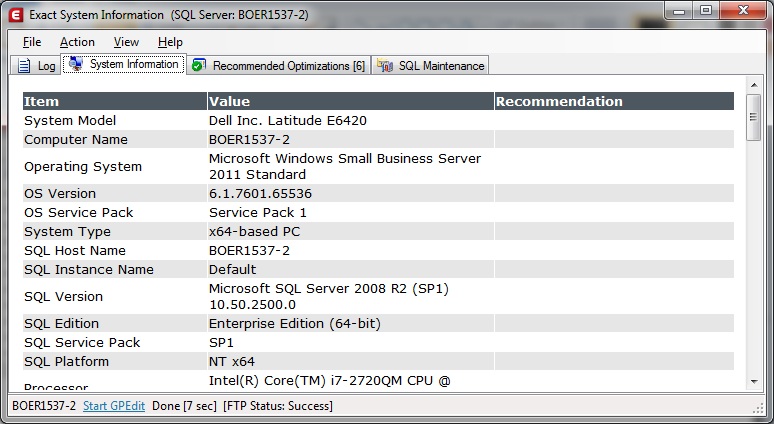
Note - This tool cannot retrieve information about the disk system (RAID Level) and how many disks are stored in the disk system!
Step 2: Applying the Recommended Optimizations
After the process is complete the number of recommendations will be displayed in the 'Recommended Optimization' tab. See example:

Selected the optimizations that you want to apply to the system (or enable the Select All option) and click on the button: 'Apply Optimizations'.
The following window will popup:

Click on the button 'Yes' to apply the recommendations or 'No' ignore the recommendations.
After the recommendations are applied the following window might popup:

It's is advisable to perform the restart of the server of the SQL instance after working hours.
Step 3: Schedule a Rebuild Index Job (not available for Express or MSDE editions)
Select an Exact database and set the time that the jobs will be executed (default 23:00 hours on Monday, Tuesday, Wednesday, Thursday and Friday) and click on the button: 'Create'. Now the SQL Job 'Optimize Rebuild Indexes [Select Database Name]' is created to optimize the index performance.
Note: If indexes are not rebuild periodically the performance will decrease!

The Delete button will remove the SQL job which is created with this tool.
The 'Overwrite existing [Rebuild Indexes/Update Statistics] job' option can be used to modify the start time of the job when the job already exists.
You are done optimizing your system for SQL.
Optionally you can schedule to update the statistics or create a daily backup of your SQL database.
Optional Optimizations:
With the use of SQL Server 2008 or newer you can implement Filtered Indexes to increase the performance in decrease the size of your indexes.
After you select a database a check is performed if the selected database does not already contain the filtered indexes and if it a Exact Globe database.
If the Implement button is enabled, you can install the filtered indexes.
For more information see the document about Filtered Indexes
Page Compression is only available on SQL Server 2008 Enterprise Edition or newer. It will increase the performance and reduces the size of your database.
After you select a database a check is performed if the selected database does not already contain Page Compression.
For more information see the document about Page Compression
<< Back
Tab: Database Information
The Information is shown in two data grids the first data grid shows important settings of all the databases.
The second data grid displays information about the size, growth and location of the database files.

<< Back
TAB: Exact Databases
The Exact Databases tab displays a result set of Exact specific related information about Error Logs, index information and statistical table information.

<< Back
The Menu
File Menu
- File: Save System Information tab to HTML or CSV format
- Print: Prints System Information and Database Information tabs to a selected printer
- E-Mail: Sends the System Information tab in HTML format to one entered e-mail address
- Options: Set the application options
Action Menu
- Connect: Displays the Connection window to make a connection to the local SQL instance
- Start Analysis: Starts the analyzing process
View Menu
- General Database Information: Show or hide the tab that contains information about database settings, location, sizes etc.
- Exact Database Information: Show or hide the tab that contains information about statistical table information, indexes usage etc.
- Toolbar: Show or Hide the toolbar containing buttons for Connect, Start Analyze, Options, Help and Exit.

- Logs: Shows the log file for Applied Optimizations applied by the tool, Error log and the created CSV file that is send to Exact.
Help Menu
- Help: Displays this document
- About: displays the version of the application
<< Back
Installation and Uninstall Information:
The Exact System Information Tool needs the Microsoft .NET Framework 2.0. If it is not installed you need to download this from the Microsoft website.
http://www.microsoft.com/downloads/details.aspx?FamilyID=0856EACB-4362-4B0D-8EDD-AAB15C5E04F5&displaylang=en
To install the application, unzip the ExactSysInfo.zip file to a folder on a hard drive. The zip contains 7 files, the ExactSysInfo.exe, ESI_Exact.SQL, ESI_AutoUpdater.exe, NTRights.exe, Page_Compress.sql, ImplementFilteredIndexesGlobe.sql and the ICSharpCode.SharpZipLib.dll.
Uninstall the application
To uninstall or remove the application you can remove the 5 files you’ve unzipped.
<< Back
How to Start the Exact System Information Tool (Exact System Info)
Execute the ExactSysInfo.exe file stored on your hard disk
<< Back
Supported en tested environments: (both x86 and x64 platforms)
Windows XP, Windows Vista, Windows 7, Windows 8, Windows Server 2000, Windows Server 2003 (R2), Windows Server 2008 (R2), Windows SBS 2011 and Windows 2012.
Microsoft SQL Server 2000, 2005, 2008 (R2) and 2012.
When you want to apply optimizations via the application ExactSysInfo.exe on a Windows Server 2008, you need to right click on the application ExactSysInfo.exe and select ‘Run as administrator’ to be able to realize the changes on the system. See example:

<< Back
Disclaimer:
In article 4.5 of the Customer License Agreement states that the license-holder is responsible for the installation and configuration of the software on his system.
The license-holder is responsible for adjustments made to the system with the use of the Exact System Information Tool.