Sales Manual - Handling back orders
Handling back orders
Introduction
This chapter describes how to handle back orders and how to take on inventory. The flowchart explains the steps in the process and the accompanying functionality in Exact Financials.
When an order is entered and there is not enough stock available you can place an item in back order. Items in back order are purchased or need to be purchased. When the goods are delivered, you can take the goods on inventory and the order can be completed.
Flowchart
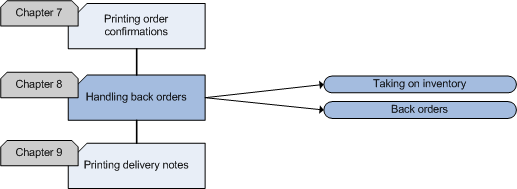
Taking on inventory
When an item is placed in back order because there is not enough stock available to fulfill the order, you will have to order the goods. As soon as you have received the goods, you can take them on inventory. This means that you adjust the stock quantities of the items. You can do so in [Sales: Processes, Take on inventory] by selecting the item of which you want to change the stock, entering the number of items you have received and clicking the 'Save' button.
Back orders
When you enter an order and there is not enough stock available to fulfill the order, the items that are not available will automatically be placed in back order. This means that the order will not be completed until there is enough stock available to deliver the goods. When your debtor does not want to have partial deliveries, you can choose to put all the items of the last order in back order.
Items can only be put in back order if the item is defined as a 'Stock item' on the 'General' tab in [Sales: Master data, Maintenance, Items, Items].
Back orders can be handled in [Sales: Processes, Back order handling].
Sales Manual > Contents > Handling back orders
| Main Category: |
Support Product Know How |
Document Type: |
Support - On-line help |
| Category: |
On-line help files |
Security level: |
All - 0 |
| Sub category: |
General |
Document ID: |
18.056.019 |
| Assortment: |
Exact Financials
|
Date: |
05-02-2009 |
| Release: |
|
Attachment: |
|
| Disclaimer |