How-to: Configuring Information Internet Services (IIS) for portals
Introduction
In Exact Synergy Enterprise, the login page has been
enhanced with a video background for the reseller, partner, and customer
portals. If the authentication has been configured with the Active Directory
Controller, you have to log in with the details of the domain, for example,
<domain>\<username>.
The two type of configurations that are supported for the
login with the video background are:
- ASP .NET forms authentication
- Basic authentication (with Microsoft Windows authentication)
This document describes the recommended configurations, and
steps required to configure the authentication in Internet Information Services
(IIS) to enable the functionality.
Creating public user access rights
For public users to be able to access the new login page,
the user “ExactWebGuest” will be used. Therefore, ensure the humres table in
the Exact Synergy Enterprise database has a record with usr_id =
“ExactWebGues”, and res_id = “-2”.
If the record does not exist, execute the SQL statement for
the database (for example, via the SQL Server Management Studio) as follows:
From product update 244
insert into humres (res_id, fullname, sur_name, usr_id, job_level, blocked,land_iso,ldatindienst,repto_id,comp,emp_type,emp_statd,emp_stat, UserLicenseType)values(-2,'ExactWebGuest','ExactWebGuest','ExactWebGuest',0,0,'ES',getdate(),1,'001 ','E',getdate(),'A',100)
insert into HRRoles (ID,RoleID,EmpID,RoleLevel) values (newid(),92,-2,3)
For example:
insert into humres (res_id, fullname, sur_name, usr_id, job_level, blocked,land_iso,ldatindienst,repto_id,comp,emp_type,emp_statd,emp_stat, UserLicenseType)values(-2,'ExactWebGuest','ExactWebGuest','ExactWebGuest',0,0,'ES',getdate(),1,'<Default division code>
','E',getdate(),'A',100)
insert into HRRoles (ID,RoleID,EmpID,RoleLevel) values (newid(),92,-2,3)
<Default division Code> = ESE default division (e.g. 001)
Note: The “ExactWebGuest” is a professional user, and
does not count towards the number of user licenses.
ASP .NET forms authentication
This configuration is recommended for the customer,
reseller, and partner portals.
In this configuration, Exact Synergy Enterprise uses the
login page with the video background for the authentication of the users
(instead of the Active Directory Controller), and the cookie for the
authentication token will be maintained for the subsequent requests.
Most of the browsers support this authentication (such as Microsoft Internet Explorer 11,
Firefox, Google Chrome, Microsoft Edge, Safari Mac, and Safari Mobile). However,
the Exact connectivity layer (web services) does not support the forms
authentication but the web services are not required for the customer,
reseller, and partner portals.
To configure Exact Synergy Enterprise with the ASP .NET forms
authentication, the following configurations are required:
- Creating public user access rights
- IIS configuration for the forms authentication
This configuration will enable the anonymous authentication
when you access http://<server>/<synergy>/.
IIS configuration for forms authentication
This section describes the steps required to configure Exact
Synergy Enterprise for the forms authentication.
- Go to IIS
Manager, right-click Default Web Site on the left panel, and then
click Add Virtual Directory.
- Type the new
virtual directory at Alias, and type the Exact Synergy Enterprise
installation directory as the website content directory at Physical path,
for example, C:\SynergyEnterprise.
- Select the virtual
directory that you created in steps 1 and 2 on the left panel under Default
Web Site, and then double-click Authentication under the IIS
section.
- In the Authentication
screen, right-click Forms Authentication, and then select Enable.
Also, right-click Anonymous Authentication, and then select Enable.
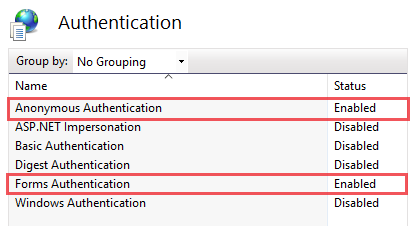
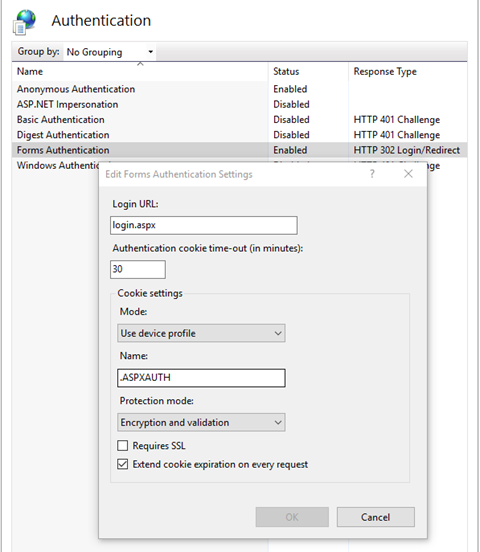
- Ensure the Response
Type is “HTTP 302 Login/Redirect” for Forms Authentication.
HTTP basic authentication
This configuration is recommended for the employee portal.
In this configuration, Exact Synergy Enterprise will use the
login with the video background to authenticate the users (against the Active
Directory Controller), and redirect the users to the Exact Synergy Enterprise
portal using the HTTP basic authentication.
Currently, only the Chrome and Firefox browsers support this
authentication.
To configure Exact Synergy Enterprise with the HTTP basic
authentication, you will need to configure the following:
- Create the local user or group
- Create the public user access rights
- IIS configuration for the basic and Windows authentication, and
anonymous authentication for the login folder
These configurations will enable the basic and Windows
authentications when the user accesses http://<server>/<synergy>/,
and anonymous authentication when the user accesses http://<server>/<synergy>/docs/login/login.aspx.
IIS configuration for the basic and Windows authentications, and anonymous
authentication for the login folder
This section describes the steps required to configure Exact
Synergy Enterprise for the Windows authentication, and basic authentication in
addition to the anonymous authentication for the login folder.
- Go to IIS
Manager, right-click Default Web Site on the left panel, and then
click Add Virtual Directory.
- Type the new
virtual directory at Alias, and type the Exact Synergy Enterprise
installation directory as the website content directory at Physical path,
for example, C:\SynergyEnterprise.
- Select the
virtual directory that you created in steps 1 and 2 on the left panel under Default
Web Site, and then double-click Authentication under the IIS
section.
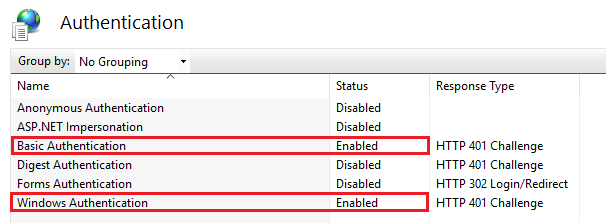
- In the Authentication
screen, right-click Basic Authentication, and then select Enable.
Also, right-click Windows Authentication, and then select Enable.
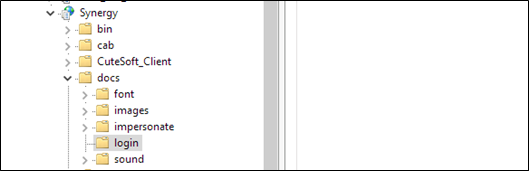
- Expand the
virtual directory browser that you created in steps 1 and 2 on the left panel,
click docs, and then click login.
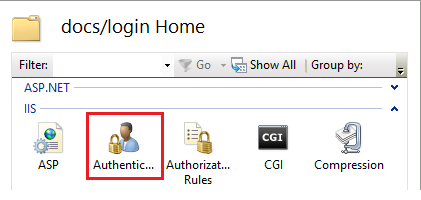
- Under the login
folder, double-click Authentication in the IIS section.
- In the Authentication
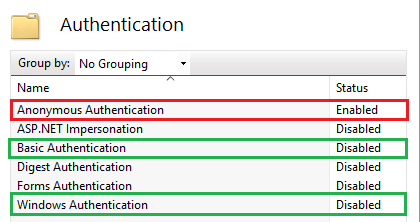
screen, right-click Anonymous Authentication, and then click Enable.
Right-click Basic Authentication, and then click Disable.
Right-click Windows Authentication, and then click Disable.
Related documents
| Main Category: |
Support Product Know How |
Document Type: |
Online help main |
| Category: |
On-line help files |
Security level: |
All - 0 |
| Sub category: |
Details |
Document ID: |
27.777.625 |
| Assortment: |
Exact Synergy Enterprise
|
Date: |
30-06-2017 |
| Release: |
|
Attachment: |
|
| Disclaimer |