Sales Manual - Reviewing and approving sales orders
Reviewing and approving sales orders
Introduction
This chapter describes the process of reviewing and correcting and
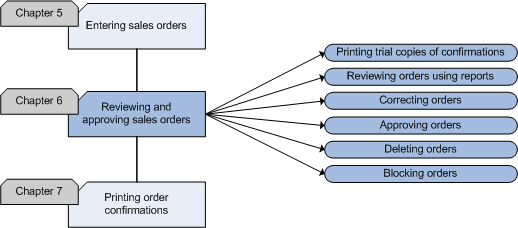
approving sales orders. The flowchart explains the steps in the process and
the accompanying functionality in Exact Financials.
The reviewing of orders is a very important step in this process. Many
problems can be prevented when mistakes are discovered before the goods are
delivered to the customer. Orders are often reviewed with trial prints of
the order confirmation as a fixed step in the process. Orders can also be
reviewed with overviews. A possible step in this process is approval of
orders. Before the approval can take place the orders have to be reviewed.
After approval, order confirmations and packing slips can be printed and
sent. When you do not use approval, you should review and correct the orders
before you print the order confirmation. Incorrect and canceled orders can
be deleted.
Flowchart
Printing trial copies of confirmations
Orders should be reviewed to avoid mistakes. When the trial confirmation
is printed, several checks can take place. The following data can be
reviewed with trial confirmations:
- The NAC data (Name, Address, City) of your company
- The NAC data of the invoice debtor and the collect debtor.
- Order date
- Delivery date
- Invoice references
- Items
- Item descriptions
- Quantities
- Prices
- Amounts
- Discounts
- Extra charges (like order and freight costs)
- Payment conditions
- Delivery method
It is very important that items, quantities, prices (price agreements)
and debtor data are displayed correctly, because the payment of the goods
depends on it. When, for example, the invoice debtor is not correct, the
payment can be delayed and the relation with your debtor may be disturbed.
Besides this, it is important to record your data correctly because the
order confirmation is printed only once. When you discover a mistake after
printing, you will have to enter the sales order all over again, which takes
you time and costs you money.
After reviewing the orders you can print trial confirmations in [Sales:
Processes, Sales orders, Sales order confirmation].
Reviewing orders using reports
Orders can be reviewed not only by using
trial confirmations, but also by using overviews. In Exact Sales, several
reports are available that can be used to review orders. For a description
of these reports, see
[Working with reports].
Correcting orders
When you discover a mistake in an order that has not yet been confirmed
and the final packing slip has not been printed yet for the order, you can
still change it. Orders can be changed and corrected by
selecting and opening the order in [Sales:
Processes, Sales orders, Sales order entry]. If the approval
functionality is enabled, orders that have been corrected will have to be
approved again.
Approving orders
Before you can print the final order confirmation, you should check the
order in detail. One person or department should decide, after checking the
order entered, the credit limit and the available stock, to approve the
order or not. This will normally not be done by the same person/department
as the one that entered the orders. The person/department that approves the
orders should have an overview of all information that is needed to decide
to approve an order or not. Approved orders can be archived to record who
approved which order.
Sales orders can be approved in [Sales:
Management, Sales order approval].
If you do not want to use the approval function, you should not select the
'Sales order: Approve' check box on the 'Order' tab in [Sales: File, Company settings, Sales settings].
In that case, you do not have to approve the order and the packing slip
can be printed without approval.
Deleting orders
A sales order can be deleted in cases whereby:
- An order is canceled
- An order is incorrect
- An order cannot be delivered
- An order has been entered twice in the system
- An order contains so many mistakes that it is easier to enter a new
order than to correct all the mistakes
You can delete sales orders in [Sales:
Management, Delete sales orders]
Blocking orders
There are times when you may want to put a
sales order on hold. You can put sales orders on hold in [Sales:
Management, Block sales orders].
Sales Manual > Contents > Reviewing
and approving
sales orders
| Main Category: |
Support Product Know How |
Document Type: |
Support - On-line help |
| Category: |
On-line help files |
Security level: |
All - 0 |
| Sub category: |
General |
Document ID: |
18.063.426 |
| Assortment: |
Exact Financials
|
Date: |
19-11-2008 |
| Release: |
|
Attachment: |
|
| Disclaimer |