Sales Manual - Printing order confirmations
Printing order confirmations
Introduction
The chapter describes the process of printing order confirmations in
Exact Sales.
Before you can issue the goods, you will have to print final order
confirmations. You only have to do this when you have defined in the
settings on the 'Order' tab in [Sales:
File, Company settings, Sales settings] that you want to use confirmation. Some companies use the signed
order confirmation returned by a customer as order form.
If you want to be able to use revenue statistics, you should use
sales order confirmation.
Flowchart
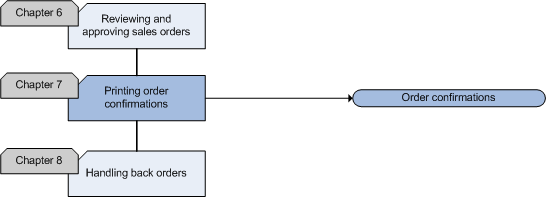
Order confirmations
The use of order confirmations can prevent mistakes: your customers can
use them to check data, such as prices, price agreements, items and delivery
dates. When mistakes are discovered, your customers can warn you on time, so
that you can correct the mistakes.
Sales order confirmations contain the following data:
- Items, quantities and quality
- Prices
- Price agreements
- Delivery date
- Items on back order
In the following situations, it is advisable to send order confirmations:
- When the company policy is to send every customer a confirmation.
- When a customer places an order that cannot immediately be fulfilled
(backorders).
- When you have agreed with the customer to send him a confirmation.
- To confirm the delivery according to the agreed conditions.
- To inform the customer about partial deliveries.
- To confirm large orders before delivery.
You can print sales order confirmations in
[Sales:
Processes, Sales orders, Sales order confirmation].
Sales Manual > Contents > Printing
order confirmations
| Main Category: |
Support Product Know How |
Document Type: |
Support - On-line help |
| Category: |
On-line help files |
Security level: |
All - 0 |
| Sub category: |
General |
Document ID: |
18.117.864 |
| Assortment: |
Exact Financials
|
Date: |
11-11-2008 |
| Release: |
|
Attachment: |
|
| Disclaimer |