Fixed Assets Manual - [Depreciation, Change depreciation methods]
[Depreciation, Change depreciation methods]
See also:
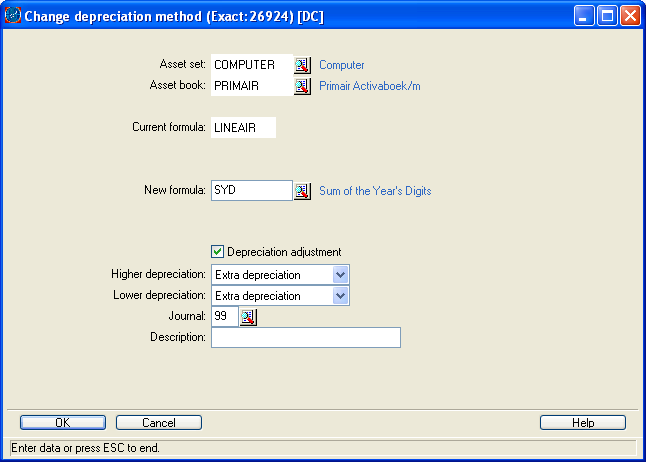
Asset set
Enter the asset set for which you want to enter a new depreciation method.
Asset book
Enter the asset book for which you want to enter a new depreciation method.
Current formula / Current index table
This field displays the current depreciation method. When an index table is linked to the formula, it is shown as well.
New formula / New index table
Select a new depreciation formula and link an index table to it, if you use an index table in th depreciation method.
Depreciation adjustment
Enable this setting if you want to recalculate depreciation so far. If this setting is enabled, you will have to select whether the depreciation adjustment:
- has to be entered in the last period during which you entered depreciation according the old method.
- has to be entered in the last period of the asset's life.
Finance Manual C/S > Contents > Working with fixed assets > Changing depreciation methods > [Depreciation, Change depreciation methods]
XEightFiveOneX
| Main Category: |
Support Product Know How |
Document Type: |
Support - On-line help |
| Category: |
On-line help files |
Security level: |
All - 0 |
| Sub category: |
Details |
Document ID: |
06.841.156 |
| Assortment: |
Exact Financials (v3)
|
Date: |
22-11-2007 |
| Release: |
|
Attachment: |
|
| Disclaimer |