E-WMS ASP error 'Error reading the available Exact License options. Object reference not set to an instance of an object"
WMS documentation
Problem
When starting E-WMS on a scanner, following error occurs:
"Error reading the available Exact License options.
Object reference not set to an instance of an object":
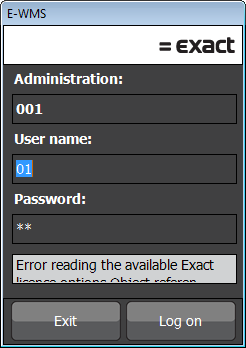
This error will only show in release 411 or higher.
Cause
- Necessary components (DLL files) are missing in Windows
- The wrong version of the package mentioned below is installed or WMS IIS
configuration is different from what you assume
Solution
- Install the Microsoft package "Visual
C++ Redistributable Packages for Visual Studio 2013".
This installation is mandatory for the E-WMS web server, starting from
release 411.
- Make sure you have the correct version installed; x64 or x86; related to
the IIS application pool setting 'Enable
32-bit applications'.
Since E-WMS ASP can run as 64bit process from release 411, preferably
install the 64bit version of the package (vcredist_x64.exe).
Related documents
| Main Category: |
Support Product Know How |
Document Type: |
Support - On-line help |
| Category: |
On-line help files |
Security level: |
All - 0 |
| Sub category: |
Details |
Document ID: |
26.748.600 |
| Assortment: |
E-WMS
|
Date: |
03-08-2017 |
| Release: |
|
Attachment: |
|
| Disclaimer |