Revision Date: 03/12/2015
Module: N/A
Version: N/A
Discussion: When running processes or reports in Progression SQL, users receive errors that the TEMPDB is full. The description line of the error message says to back up the transaction log to free up some log space. However, the "Table or Script" line points to a Progression data table. Backups are done everynight, how do I resolve this issue?
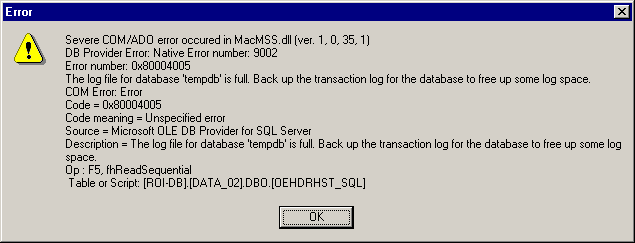
Solution: Several resolution steps may be necessary to resolve this issue:
1) Stop and start the MSSQL Server services. Each Stop/Start of the MSSQL Service recreates the TEMPDB database (TEMPDB database is installed by MSSQL). TEMPDB is set by default (and should always remain) as Simple recovery model, which means that the log file is truncated at each checkpoint when a backup is performed. If the TEMPDB log is growing when the simple recovery model is used, it is possible that one or more open transactions are preventing the release of disk space. This could be from transactions that should have closed but failed without properly closing.
2) Looking at the screen shot above you will see the informational line "Table or Script: [ROI-DB].[Data_02].DBO.[OEHDRHST_SQL]". This indicates that there may be an index or data problem with the OEHDRHST_SQL table in database Data_02. The OEHDTHST_SQL should be Exported, Initialized, and then Imported through Progression's System Manager module.
3) Check available hard drive space on the Server for the application(s).
4) If the TEMPDB is full message appears while running AR\AP ageing reports and the Progression version is 76200 or higher, then edit the MACSQL.CFG file located in the \MACAPPS\MACSQL folder. Remove the section if present [MSL] further information on this files see knowledgebase article 12.609.490.
Attachments: N/A
Keywords: Tempdb, MSL, MACSQL.CFG, Transaction log, SQL, tempdb is full
Additional Resource: FREE on-demand training - Document: 10.040.533 - Americas Training Start Page