French Perpetual Inventory
Introduction.
If you work with Perpetual inventory, all your movements
that are linked to the inventory management will have direct impact on your financial
accounting. This refers either to the receiving or fulfilment of your goods.
The French method in particular passes the purchase entry into the expense
account and not into the balance sheet account, as is the case for the English
method. This document will explain the different steps of the French Perpetual
Inventory.
|
Module
|
Type
|
Journal
|
Compte
|
Débit
|
Crédit
|
|
Purchase
|
Receipts
|
General Journal
|
Stock
|
100
|
|
|
|
|
|
Invoice to be
received
|
|
100
|
|
|
Puchase invoice
|
Purchase
|
Accounts payable
|
|
121
|
|
|
|
|
Stock purchase
cost
|
100
|
|
|
|
|
|
VAT to be
claimed
|
21
|
|
|
|
|
General Journal
|
Invoice to be received
|
100
|
|
|
|
|
|
Stock changes
|
|
100
|
|
Sales
|
Fulfillment
|
General journal
|
Stock changes
|
100
|
|
|
|
|
|
Stock
|
|
100
|
|
|
Sales invoice
|
Sales
|
Account receivable
|
121
|
|
|
|
|
|
Revenues
|
|
100
|
|
|
|
|
VAT to be paid
|
|
21
|
Settings.
Before passing your purchase entries, different settings
have to be defined.
1) General
Settings
In the general settings, menu
<System-General-Settings>, in the tab 'Inventory settings', you can
define the valuation method you want to use.
For French Perpetual inventory, you should select the option
<<Perpetual Inventory>>.

2) Invoice to be
received account and stock journal.
Again in the general settings, menu
<System-General-Settings>, in the tab 'General ledger accounts', you have
to define the account that will be used for invoices to be received and the general
journal that will be used for the stock changes.
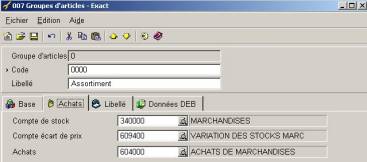
3) Item group.
To define the item group, menu <System-Logistics- Item
groups>, you have to define the relationship between the item group and the
general ledger accounts.
A. Puchase
invoice accounting
To better understand the entries, we will use an example. We
created a purchase order of 100€. The purchase invoice that we received will be
110€.
1) Purchase order
to your supplier.
During the creation of your order, menu
<Purchase-Entries-Purchase order>, no movement of stock is generated in
your accounts. This is because there is no movement of physical stock and the
purchase order is only a receipt planning. It also allows you to know the stocks
that are waiting to be received.
2) Receipts of
goods.
When you have received your ordered goods, menu
<Purchase-Entries-Receipts>, an accounting entry will be created for your
stock value in your financial accounting. This entry will be generated in the
general journal as follows:
|
Account
|
|
Debit
|
Credit
|
|
Stock
|
340000 (1)
|
100
|
|
|
Invoice to be received
|
444000 (2)
|
|
100
|
(1)
The stock account defined in the item
maintain screen.
(2)
The invoice to be received account defined
in general settings.
The value
in these accounts are taken from the registered purchase order.
3) Creation of
purchase invoice.
The entry of the purchase invoice must be done in the
financial accounting directly, menu <Finance-Entry-Purchase> in the
purchase journal. The entry that is generated will be as follows:
Account
|
|
Debit
|
Credit
|
|
Accounts payable
|
440000 (1)
|
|
133,1
|
|
Invoice to be received
|
444000 (2)
|
110,0
|
|
|
VAT to be claimed
|
411000 (3)
|
23,1
|
|
(1) The accounts payable account defined in the purchase journal maintain
screen that you had selected.
(2)
The invoice to be received account
defined in the general settings.
(3)
the VAT to be claimed account defined in
the used VAT code. In this case, the VAT is 21%.
The value
in these accounts are taken from the registered purchase order.
4) Inventory
reconciliation.
The inventory reconciliation is a very important step in
Exact Globe 2003. It links the invoice received with the receipt of goods.
Menu <Stocks-Warehouse management-Reconcile>
If there is a difference in amount between the receipt and
the purchase invoice, the receipt entry is corrected to balance the Invoice to
be received account. The entry generated for this case will be:
|
Account
|
|
Debit
|
Credit
|
|
Stock
|
340000 (1)
|
110
|
|
|
Invoice to be received
|
444000 (2)
|
|
110
|
For more explanation on this, please refer to the document: Réconciliation
logistique.
5) Perpetual
inventory.
The menu of perpetual inventory <Stock-Warehouse management-Perpetual
inventory> will modify the already created purchase entry by passing the
purchase entry not to a balance sheet account but to an expense account as is
the French method.
This modification takes place in 2 steps:
a) Correction of
the purchase entry.
In a purchase invoice that you had created at point 3, the
account <<Invoice to be received>> has been used instead of the
account <<Purchase goods cost>>. When starting the application, the
account <<Invoice to be received>> will then be replaced by the
account <<Purchase goods cost>>.
|
Account
|
|
Debit
|
Credit
|
|
Accounts payable
|
440000
|
|
133,1
|
|
Purchase goods
cost
|
604000 (1)
|
110,0
|
|
|
VAT to be claimed
|
411000
|
23,1
|
|
(1) The account purchase goods cost is linked to the item
group.
b) Creation of a
general journal entry.
A general entry is created at the same time to balance the
account «invoice to be received» with the account <<stock
changes>>.
|
Account
|
|
Debit
|
Credit
|
|
Invoice to be received
|
444000 (1)
|
110
|
|
|
Stock changes
|
609000 (2)
|
|
110
|
(1)
The account of invoice to be received
defined in the general settings.
(2)
The account stock changes
defined in the item maintain screen.
To have more explanation about this, please read the
document: Perpetual inventory
B.
Fulfillment and sales accounting.
If you use the sales order module as well, it is when you had
fulfilled the stock that an account entry is generated in your accounting so
decreasing the value of your stock.
|
Account
|
|
Debit
|
Credit
|
|
Stock changes
|
609000
|
100
|
|
|
Stock
|
340000
|
|
100
|
The value that will be taken for this entry depends on the
method of valuation that is used. (FIFO, LIFO, APP, SCP)
C. Sales
accounting
When you print your sales invoice definitively, the sales
entry will then be generated in your sales journal.
|
Account
|
|
Debit
|
Credit
|
|
Account receivable
|
440000
|
121
|
|
|
Revenue
|
700000
|
|
100
|
|
VAT to be paid
|
441000
|
|
21
|
This document has been translated from the original French
document 06.002.164.