Fixed Assets Manual - [Master data, Maintenance, General, Depreciation formulas]
[Master data, Maintenance, General, Depreciation formulas]
Formula
Enter a unique code for the depreciation formula you are creating.
Precision
Enter the precision you want to use in your depreciation formula.
Fields (Button)
Click 'Fields' to create your formula.
Select the category you want to choose from: Fields or Functions.
Select a field or function you want include in your formula.
If you select a function, click 'Next' to enter the Field or another the function on which the function should work.
Click 'Back' if you want to correct any errors. Click 'Finish' when the formula is completed.
Example
You want to include the absolute value of the book value (Basic amount - depreciation so far) in the formula.
- Click the 'Fields' button.
- Select functions.
- Select 'ABS'.
- Click 'Next'.
- Use the
 button to select the fields
- Enter a formula.
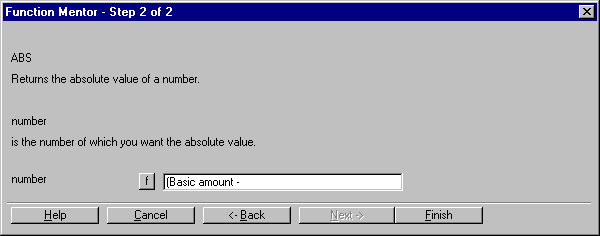
- Click 'Finish' if the function is completed.
Repeat these steps until you have a complete depreciation formula.
Formula test (Button)
Click 'Formula test' to test the depreciation formula you have created.
Finance Manual C/S > Contents > Working with fixed assets > Creating depreciation formulas > [Master data, Maintenance, General, Depreciation formulas]
XEightTwoEightX
| Main Category: |
Support Product Know How |
Document Type: |
Support - On-line help |
| Category: |
On-line help files |
Security level: |
All - 0 |
| Sub category: |
Details |
Document ID: |
06.841.131 |
| Assortment: |
Exact Financials (v3)
|
Date: |
21-11-2007 |
| Release: |
|
Attachment: |
|
| Disclaimer |