Online help file: Office Add-in uninstall
Introduction:
This document explains how the Office add in can be uninstalled after use, in case the machine needs to be 'cleaned'.
Explanation:
The folder ‘Downloaded Program Files’, which is a subfolder of the Windows/Winnt folder, stores the Exact e-Synergy Office Add-in files.
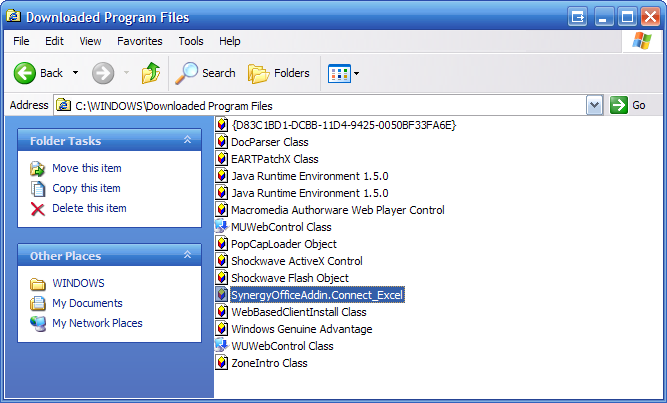
To clean your machine remove the files with Synergy in the filename. To remove those files, click them with the right mouse key and select ‘Remove’.
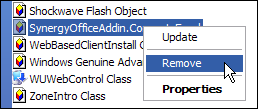
Removal is only possible if no MS Office applications are loaded at that moment. Otherwise removal is possible after reboot.
Furthermore you need to remove any registry keys in relation to the office add-in (see The registry keys made by the Office add in). To make sure everything is gone delete the SynergyOfficeAddin.dll using MSDOS (see 'The files placed by the Office add in' to find the files).
In the Office applications the menu is now still available, but will not do anything. To remove the menus from the Microsoft applications, use document 01.784.743.
Automatic uninstall:
- Download attached file.
- Unzip the file on the PC where the uninstall should be executed.
- Run the UninstallAddin.bat file.
The office addin is now uninstalled. You will still see the e-Synergy link in the MS Office applications though. These can be removed manually by using the procedure in this document.
Related topics:
| Main Category: |
Support Product Know How |
Document Type: |
Online help main |
| Category: |
On-line help files |
Security level: |
All - 0 |
| Sub category: |
General |
Document ID: |
03.047.855 |
| Assortment: |
Exact Synergy
|
Date: |
16-03-2017 |
| Release: |
|
Attachment: |
|
| Disclaimer |