Sales Manual - Package introduction for Exact Sales: Sales invoices
Sales invoices
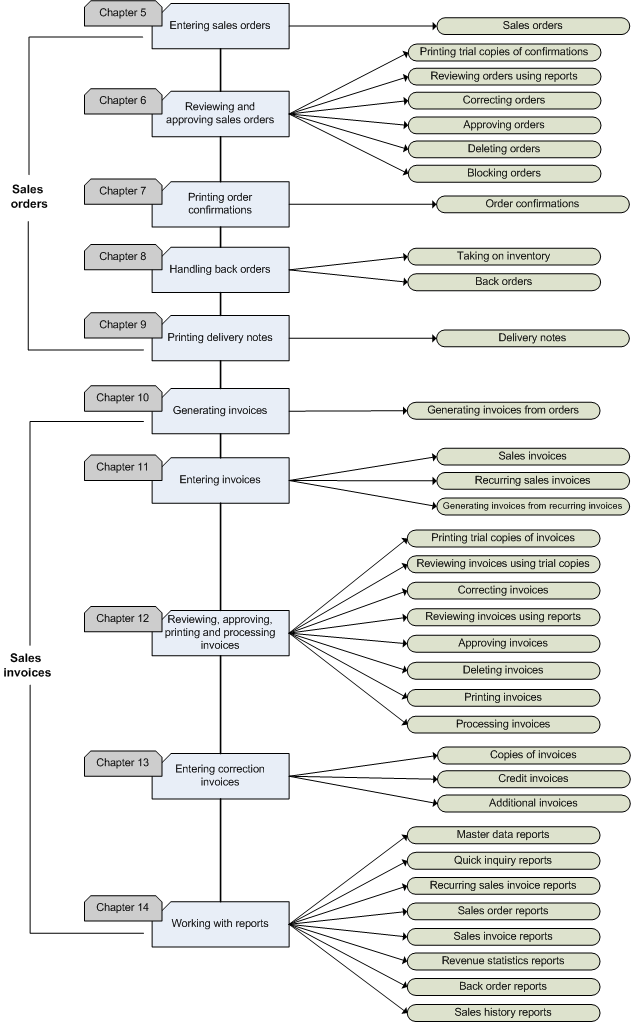
The description of the functionality of Exact Sales is based on logical steps in the process, which you can see in the flowchart. Below, you can find a summary of the different steps involved in entering and processing sales invoices:
- Defining settings and creating master data
Start with defining the package settings for this administration. These settings determine which options are available and how different functionality can be used. The master data that is described in this chapter is essential for some settings. You should create the financial and logistic master data.
- Creating invoices
Exact Sales offers several possibilities to create invoices. When you use the sales order module, an invoice is created when the final packing slip of a sales order is printed.
- Entering invoices
You can enter invoices manually as well as view and modify invoices that you have already created when printing the final packing slips of the sales orders.
- Reviewing, approving, printing and processing invoices
After you have entered the invoices, you should review the invoices to ensure that you have entered them correctly. You can review the invoices by using trial printing or using the available reports. For a better approach, Exact Sales provides settings to allow you to indicate that is it mandatory for the invoices to be approved before printing. See [Sales settings]. After printing trial copies of the invoices and correcting any errors, you can print the final copies of the invoices. You can set the invoices to be processed automatically or you can also choose to process your invoices manually.
- Entering correction invoices
It is possible that incorrect invoices are sent to customers. In this case, you can create credit invoices and send to your customers. When final copies of the invoices are damaged or never received, you can print extra copies of the same invoices.
- Using historical overviews
You can retrieve historical invoice data from historical invoices and revenue statistics.
Flowchart
Sales Manual > Contents >
Package introduction for Exact Sales >
Sales invoices
| Main Category: |
Support Product Know How |
Document Type: |
Support - On-line help |
| Category: |
On-line help files |
Security level: |
All - 0 |
| Sub category: |
General |
Document ID: |
18.055.708 |
| Assortment: |
Exact Financials
|
Date: |
05-02-2009 |
| Release: |
|
Attachment: |
|
| Disclaimer |