XML questions related to the Office Add In
XML
The e-Synergy Office Add in depends on
Microsoft XML components. Sometimes not all required components are
installed causing the Office Add in not to work. If, for example, MSXML 3 is not installed, the
user will not be able to select main categories, categories
and subcategories when saving a document.
The Office Add In uses xml to upload documents to the server but since batch
248 the xml components require the web server to be provided with msxml version
4 as well as msxml version 3. The versions installed on the webserver can be
verified by accessing this
page in Internet Explorer on the web server.
If msxml version 3 is not installed you can install it here
.
If msxml version 4 is not installed you can install it here
.
Note: the msxml 4 components are only required on the web server
e-Synergy is running on, the clients require a minimum version of msxml 3
components, these components are installed during the installation of the office
add in on the client's computer
In some cases Windows has lost the registration of MSXML, but because
the files are present on the system a reinstall of MSXML will tell MSXML is
already installed. Then manualy re-registering the MSXML components can help.
This can be done by executing the following command in DOS
in the 'Windows\System32'-folder:
for %1 in (msxml*.*) do regsvr32 %1 /s
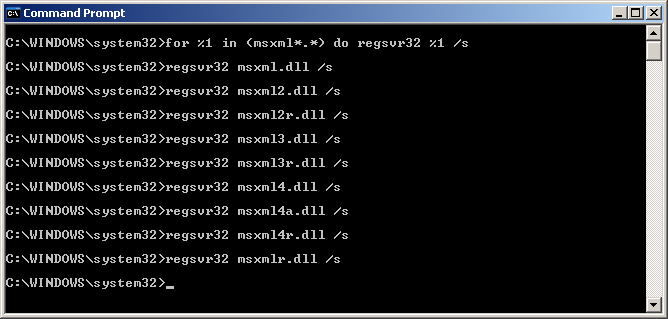
Note: the user executing this command should have local administrator
rights on the machine where the command is executed.
| Main Category: |
Support Product Know How |
Document Type: |
Online help main |
| Category: |
On-line help files |
Security level: |
All - 0 |
| Sub category: |
General |
Document ID: |
01.359.214 |
| Assortment: |
Exact Synergy
|
Date: |
19-05-2018 |
| Release: |
|
Attachment: |
|
| Disclaimer |