Sales Manual - Entering correction invoices
Entering correction invoices
Introduction
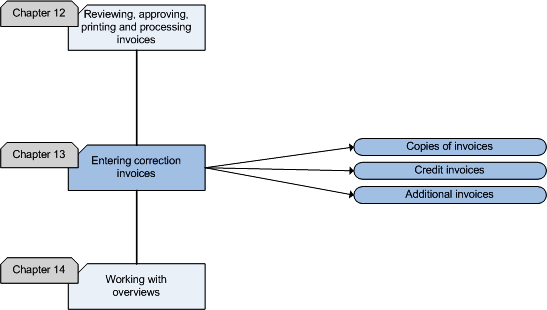
This chapter describes the process of creating correction invoices. The
flowchart illustrates the steps in this process and the matching
functionality in Exact Sales.
After printing the final copies of the invoices, the details of the
invoices can no longer be changed. When any details of the invoice has to be
changed, you have to enter a correction invoice, which can be an additional
invoice or a credit invoice. It is also possible to print a copy of an
invoice for the customer who has lost the original invoice.
Flowchart
Copies of invoices
After the final copies of the invoices have
been printed and sent, a debtor may ask for a copy of an invoice because he
lost the invoice or never received the invoice. You can make a copy of the
invoice in your archive, but that is not always the most economic solution.
In Exact Sales, you can always reprint an invoice, but only if it has not
yet been processed. When the invoice is processed, Exact Sales offers the
possibility to print another copy of the invoice from the history in [Sales:
Processes, Sales invoices, Print sales invoices from history].
Credit invoices
Credit invoices or credit notes can be created in [Sales:
Processes, Sales invoices, Create credit notes] if a customer has
received an invoice with an incorrect amount or when the customer is charged
more than he should have been. Credit invoices can be sent in the following
situations:
- When an invoice contains incorrect quantities or amounts.
- When the prices on the invoice are incorrect because price lists are
not taken into account.
- When a customer returns goods for which an invoice was already sent.
- When a customer refuses to pay for defect items or incomplete
services.
A credit invoice must be sent because the original invoice is no longer
applicable.
After creating the credit invoice, you should check it in
the same way as you check your invoices. It is essential that prices,
amounts and items are correct on the credit invoice. When a credit invoice
is sent because a mistake has been made, the debtor control department
should
be involved. This department should check whether the invoice is correct to
prevent further problems. After the credit invoice has been checked, the
credit invoice can be printed and sent.
In a different scenario whereby the original invoice is returned, you can
enter a new invoice for the credit invoice that will be sent for the
remaining amount. When only a part of the goods delivered is returned, you
will have to send an invoice for the remaining goods.
Additional invoices
Sometimes mistakes are only discovered when an invoice has already been
sent to a debtor. For example, a debtor may have been charged for a higher
or lower amount than he should have been caused by an item being left out on
the invoice. When an invoice has been sent for a lower amount, you can
create and send an additional invoice in [Sales:
Processes, Sales invoices,
Sales invoice entry]. This is done in the same way as entering a
normal invoice.
After the entry of an additional invoice, you should check the invoice in
the same way as you check normal invoices. The person or department involved
should check the additional invoice to prevent further problems. After the
additional invoice has been checked, the invoice can be printed and sent.
Sales Manual > Contents > Entering
correction invoices
| Main Category: |
Support Product Know How |
Document Type: |
Support - On-line help |
| Category: |
On-line help files |
Security level: |
All - 0 |
| Sub category: |
General |
Document ID: |
18.054.251 |
| Assortment: |
Exact Financials
|
Date: |
11-11-2008 |
| Release: |
|
Attachment: |
|
| Disclaimer |