PU503 (Globe+): Email templates in document settings
From this product update, you can use an email template to include sales invoices, purchase orders, RTV orders, blanket PO, sales orders, RMA orders, and blanket SO information.
Fields added in Document settings
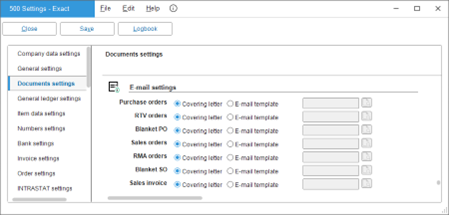
We have added the Purchase orders, RTV orders, Blanket PO, Sales invoice, Sales orders, RMA orders, and Blanket SO fields with the Covering letter and E-mail template options under the E-mail settings section at . When you want to include a purchase order, RTV order, blanket PO, sales invoice, sales order, RMA order, or blanket SO details in your emails, you can use this template. For more information, see Document settings.
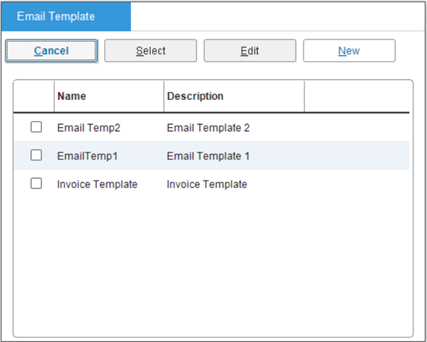
You will see the screen below when you click the browse icon at Purchase order, RTV orders, Blanket PO, Sales invoice, Sales orders, RMA orders, or Blanket SO.
Using email templates
You can use the email template in the screens below:
- To view the Print purchase orders screen, go to and select the Purchase order option at Type.
- To view the Print RTV orders screen, go to and select the RTV option at Type.
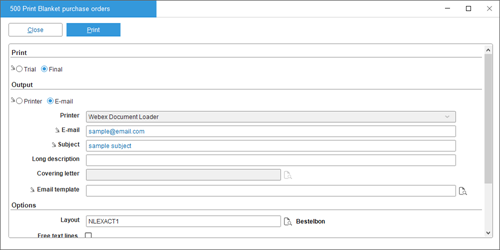
- To view the Print Blanket purchase orders screen, go to
- To view the Print invoices screen, .
- To view the Print sales orders screen, go to .
- To view the Print RMA orders screen, go to , and select the RMA order option.
- To view the Print Blanket sales orders screen, go to .
Purchase orders, RTV orders, blanket purchase orders, sales orders, blanket sales orders, and RMA orders
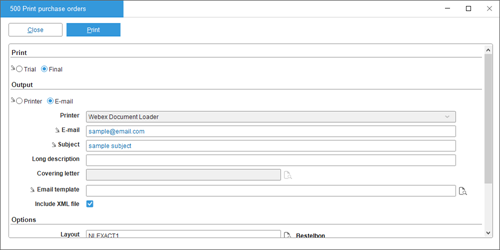
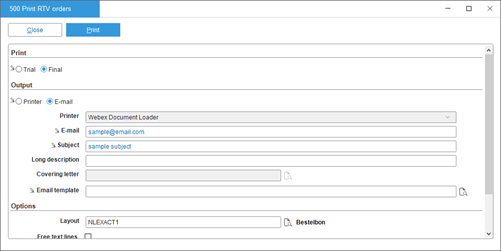
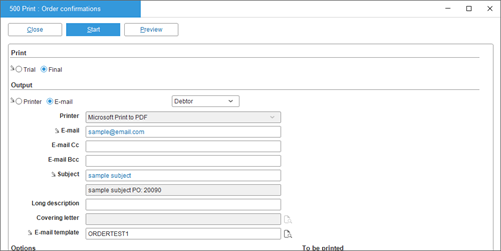
If you have selected and specified the E-mail template option at Purchase orders, RTV orders, Blanket PO, Sales orders, RMA orders, and/or Blanket SO at , the Email template field in the Print purchase orders, Print RTV orders, Print Blanket purchase orders, Print sales orders, Print RMA orders, and Print Blanket sales orders screens will be enabled and mandatory. For more information, see Printing blanket purchase orders, Printing purchase orders and Return to Vendor (RTV) orders, Generating and printing invoices for sales orders and service orders, Printing blanket sales orders, and Printing sales order, service order, and RMA order confirmation slips.
Sales invoice
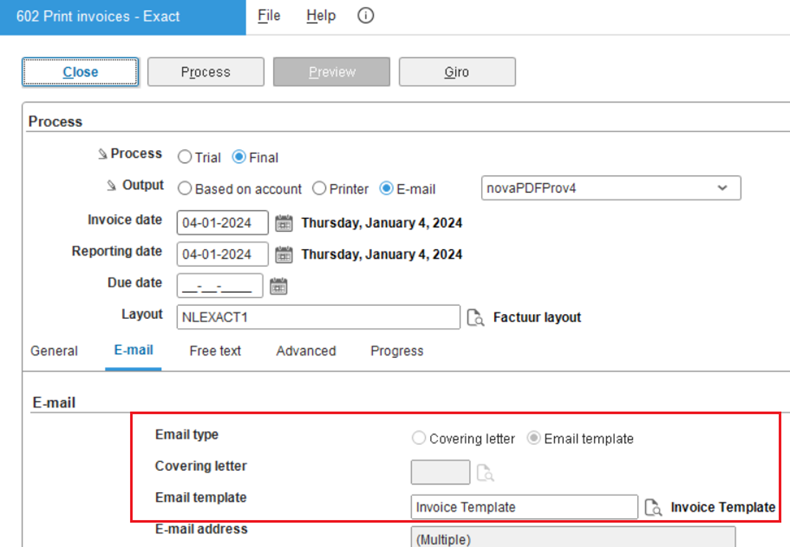
If you have selected and specified the E-mail template option at Sales invoice at , in the Print invoices screen, the Email template option for the Email type field will be automatically selected. Consequently, the Email template field will be enabled and mandatory. Furthermore, the E-mail option at Output under the Process section must be selected. For more information, see Printing and processing invoices.
Blocks available for use when creating an email template
In the create or edit email template screen (at , select the E-mail template option at Purchase orders, RTV orders, and/or Blanket PO under the E-mail settings section, and click the browse icon), the purchase orders blocks listed below are available for use:
- Address block
- Carry forward block
- Cont. block
- Total block
- Header block
- Trial order block
- Text block 1
- Text block 2
The blocks listed below are available for sales invoices:
- Address block
- Header block
- Total block
- Giro collection block
- Trial invoice block
- Carry forward block
- Continuation block
- Free text block
- Invoice copy block
- Original block
- Payment term header
The blocks listed below are available for sales orders:
- Address block
- Header block
- Total block
- Giro collection block
- Trial del. note block
- Carry forward block
- Trial conf. block
- Free text block
- Continuation block
- Payment term header
| Main Category: |
Attachments & notes |
Document Type: |
Release notes detail |
| Category: |
|
Security level: |
All - 0 |
| Sub category: |
|
Document ID: |
31.812.118 |
| Assortment: |
Exact Globe+
|
Date: |
04-06-2025 |
| Release: |
|
Attachment: |
|
| Disclaimer |