Using the Exact.XML.Launcher.Tools tool
Introduction
The Exact.XML.Launcher.Tools.exe tool is used to generate the command line for the Exact.XML.Launcher tool. The Exact.XML.Launcher tool is used to import and export the contents of your database to another database.
You must know about the data import and export process, and you must be familiar with the usage of these tools to ensure that the process runs smoothly. Make sure that you have created a backup before you proceed.
Executing the Exact.XML.Launcher.Tools tool
The Exact.XML.Launcher.Tools tool is found in the subfolder of your installation folder. Double click the file to execute it.
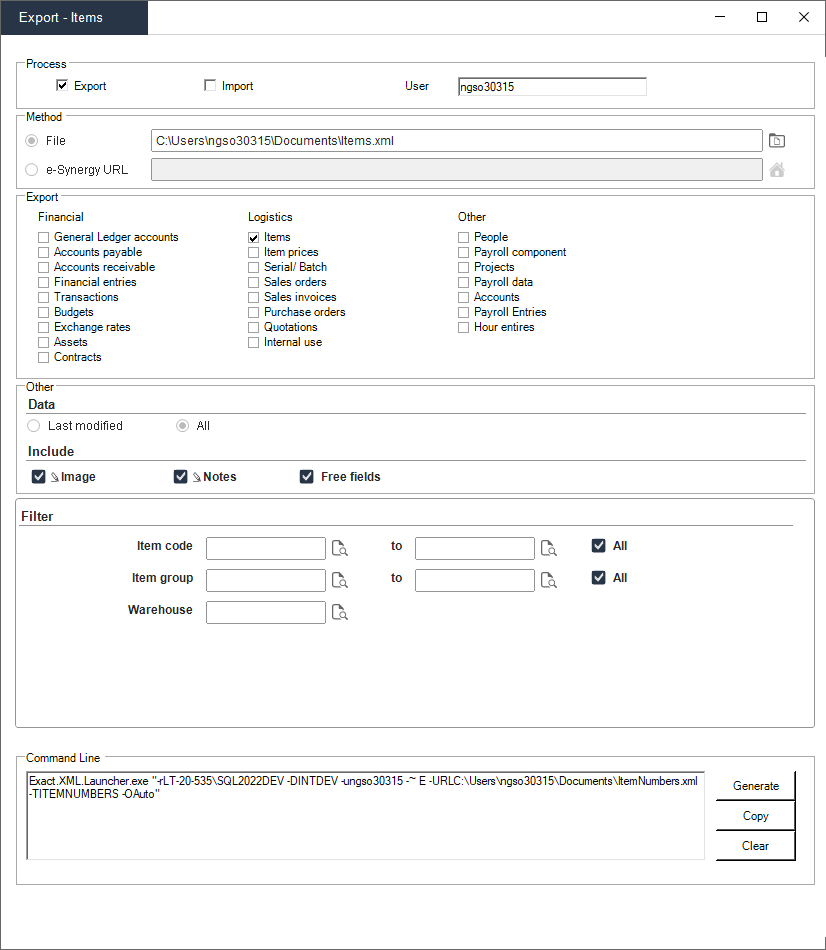
The following is an example of the export screen of the tool:

Properties
|
Section
|
Field
|
Description
|
|
Process
|
Export
|
Select this option to perform the Export process.
|
|
|
Import
|
Select this option to perform the Import process.
|
|
|
User
|
This is usually prefilled with your Windows username. Fill this up with it, if not.
|
|
Method
|
File
|
Location of a file.
|
|
|
e-Synergy URL
|
The URLs from Exact Synergy defined at will be displayed.
|
|
Export/Import
|
List of options to choose
|
Select the data that you want to export/import.
|
|
Other
|
Data
|
Specify whether you want to export/import all data or only the data that was last modified.
|
|
|
Include
|
Specify whether you want to include images, notes, or free fields in your export/import.
|
| Filter |
List of applicable fields |
Filter the data that you want to export/import. Note that the list of applicable fields is different depending on what is selected in the Export/Import section. |
|
Command Line
|
Exact.XML.Launcher command line
|
Command line to be used in silent mode.
|
|
Button
|
Generate
|
Generate command line.
|
|
Copy
|
Copy to clipboard.
|
|
Clear
|
Clear the command line.
|
| Main Category: |
Attachments & notes |
Document Type: |
Online help main |
| Category: |
|
Security level: |
All - 0 |
| Sub category: |
|
Document ID: |
31.557.778 |
| Assortment: |
Exact Globe+
|
Date: |
19-05-2026 |
| Release: |
503 |
Attachment: |
|
| Disclaimer |