Fixed Assets Manual - [Reports, Asset quick inquiry]
[Reports, Asset quick inquiry]
This report shows all fixed assets which are included in your fixed asset accounting system. For all fixed assets the status (active, sold, etc.) is displayed. For more information on a particular asset, you can zoom in on a number of overviews. You can retrieve more information by clicking the fixed asset you want to display.
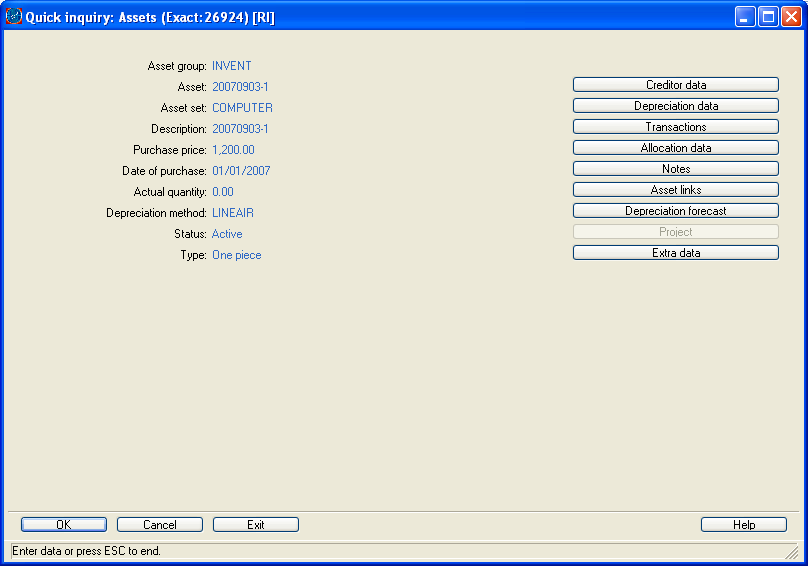
In the screen that appears, you can find detailed information regarding the fixed asset. By using the buttons, you can retrieve even more detailed information.
Example
You want to know the current book value of a fixed asset.
Start [Reports, Asset quick inquiry] and select the fixed asset. Double-click on the fixed asset. Next, select the depreciation data. On the screen that appears you find detailed information per asset book regarding the depreciation of the selected fixed asset, including the current book value.
Finance Manual C/S > Contents > Working with fixed assets > Working with asset overviews > [Reports, Asset quick inquiry]
XEightSevenOneX
| Main Category: |
Support Product Know How |
Document Type: |
Online help main |
| Category: |
On-line help files |
Security level: |
All - 0 |
| Sub category: |
Details |
Document ID: |
06.841.176 |
| Assortment: |
Exact Financials (v3)
|
Date: |
23-11-2007 |
| Release: |
|
Attachment: |
|
| Disclaimer |