Issue
Slow performance Exact
Financials C/S with Oracle due to differences in registry language settings
between server and clients.
Some
customers have reported experiencing (very) bad performance in certain functions
of Exact Financials C/S with an Oracle database
environment. In most cases a long time is needed before the selection screen is shown
in Exact.
Some of the functions mentioned
are:
- Financials preferences, menu
path <FYF>
- General ledger cards, menu path <LG>
- Debtor (and creditor) cards, menupath <DD>
(and <CC>) when using the browse for debtors (creditors)
Normally
when using these functions, a waiting time of a few seconds can be expected. When
having this situation some customers reported waiting times of 30 to 40 seconds
in Exact before being able to give in a selection.
When this situation occurs, one of the reasons can be
the difference in language settings between the database server and the Windows
clients where the Oracle client software is installed. In general when Exact
Financials C/S is set up with an Oracle database environment, the Oracle
language setting is American on server and clients.
When the clients use a
Dutch language setting and the server an American, this causes the Exact
application to be slow in some functions.
Solution
There are 2 possible solutions
to deal with this issue when occurring. First there has be checked what the
client setting for the Oracle language is:
- Open the registry editor (regedit).
- Go to the key HKEY_LOCAL_MACHINE/SOFTWARE/ORACLE and check the value
for NLS_LANG.
- Standard
the value for this setting is:
AMERICAN_AMERICA.WE8ISO8859P1 .
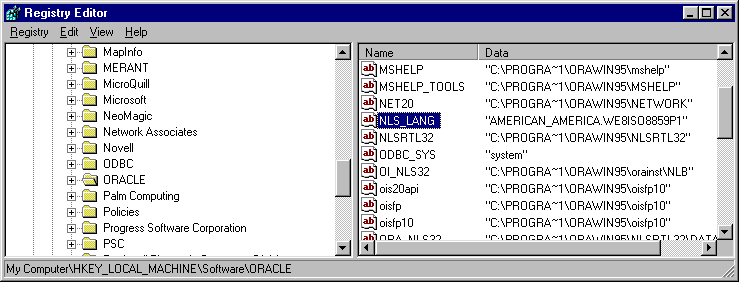
When the value for NLS_LANG shows DUTCH_THE NETHERLANDS.WEISO8859P1, the next 2 solutions
can be tried:
- Change the setting for NLS_LANG to:
AMERICAN_AMERICA.WE8ISO8859P1
- Add the following setting to the
registry key HKEY_LOCAL_MACHINE/SOFTWARE/ORACLE:
NLS_SORT="BINARY"