Adding a Document preview section to a request
Introduction
In the request type setting you have the possibility to use the setting Document preview. This document shows an example how to use this.
The document preview supports attachments within documents in Exact Synergy Enterprise, whereby the attachment is displayed via pdf control. The following formats are supported for this type:
- bmp,
- jpe,
- jpg,
- jpeg,
- gif,
- tif,
- png, and
- pdf.
Example
In this example, a request is created in which you can link a document. This document contains an attachment (for instance an invoice) for which a preview should be displayed in the request. In this example it's assumed that you already have a request type definition that contains the Document field, in which you can link a document.
Steps
- Open the request type of the request in which you want to display the preview of the document attachment.
- Open the Fields tab.
- Click Add (Section).
- At Type select the option Document preview.
- Click the Customize icon at the Browser field.
- In the new window at Browser, select a browser. e.g. DocumentAttachment.
- Furthermore the fields Result column and the section Query parameter in which you can link a Request field to the parameter, are available.
The available result column and parameters depend on the browser you've selected. In this example for this browser you select the option EntityID at the field Result column.
In the section Query parameter at bd.ID you select the request field that is the source for the data that has to be displayed. In this example this is the field Document because the attachment (of the document linked at the Document field in the request), should be displayed in the request. You can also select a free guid field if the request contains a free guid field in which you link a document.
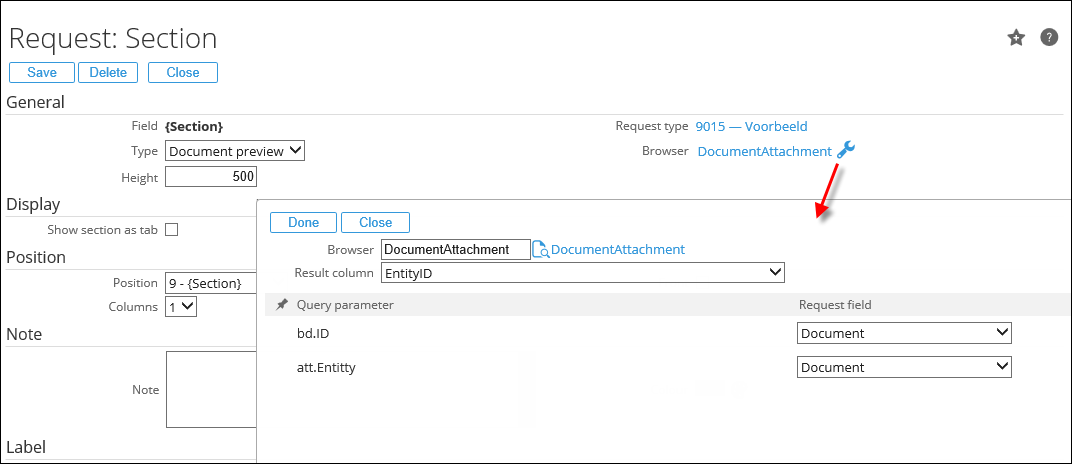
- After you've selected the browser and defined the result column and query parameters, click Done.
- Click Save to save the section.
- Click Save to save the request type.
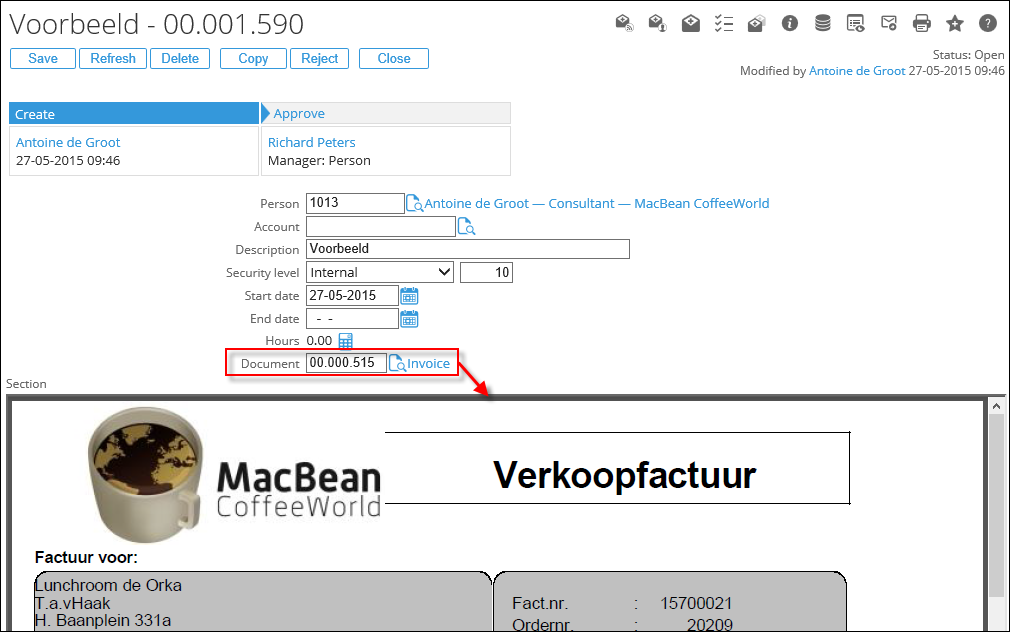
- When creating a new request of this type you can link a document with an attachment at the Document field.
- After submitting the request, a preview of the attachment of that document will be displayed in the request:
More information
| Main Category: |
Attachments & notes |
Document Type: |
Support - On-line help |
| Category: |
|
Security level: |
All - 0 |
| Sub category: |
|
Document ID: |
26.577.302 |
| Assortment: |
Exact Synergy Enterprise
|
Date: |
25-09-2025 |
| Release: |
252 |
Attachment: |
|
| Disclaimer |