Sales Manual - Generating invoices
Generating invoices
Introduction
This chapter describes the automatic
generation of invoices from orders when the delivery notes are printed. The flowchart illustrates the steps in
this process and the accompanying functionality in Exact Financials.
Flowchart
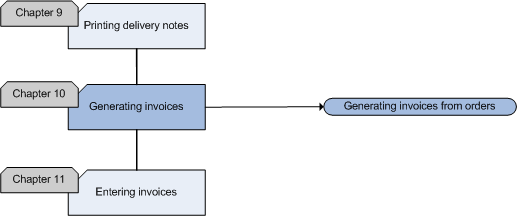
Generating invoices from orders
When you create sales orders in Exact Sales, you can use an order to generate
an invoice. The orders will automatically be converted to invoices when the
delivery notes are printed. So, you do not have to enter invoices for the
entered orders. This will save a lot of time because you only have to
enter the order and invoice data once. The order data will be converted into
invoice data and no mistakes will be made in this part of the process. You
will still be able to modify details of the invoices based on orders, if
required, by selecting an invoice and clicking Open.
By linking invoice codes to orders, you group the invoices on source,
country, user or financial year. You can enter an invoice code when printing
the delivery note. When you are printing delivery notes in several ranges, the
orders can be linked to different invoice codes.
Troubleshooting- How can I find the
invoice when I do know the invoice code, but I do not know the sequence
number?
You can search for the sequence number in the
overviews sorted by invoice code.
Sales Manual > Contents > Generating
invoices
| Main Category: |
Support Product Know How |
Document Type: |
Support - On-line help |
| Category: |
On-line help files |
Security level: |
All - 0 |
| Sub category: |
General |
Document ID: |
18.053.734 |
| Assortment: |
Exact Financials
|
Date: |
05-02-2009 |
| Release: |
|
Attachment: |
|
| Disclaimer |