PU 508 | 507 | 506 (Globe+): French e-Invoicing supported (French legislation)
To support the French e-invoicing legislation, Exact Globe+ introduces French e-invoicing and e-reporting capabilities. This enables organisations operating under the French legislation to generate compliant electronic invoices in Factur-X format and maintain the required identification information for electronic invoicing.
e-Invoicing applies to the following:
- Domestic B2B - Invoices where both supplier and
customer are established in France and the transaction is within the French VAT
invoicing scope.
e-Reporting applies to the following:
- B2C sales – Transaction data is reported instead
of sending an e-Invoice platform to the consumer.
- Cross-border B2B flows (intra-EU and extra-EU
sales or purchases) – France still requires structured reporting of VAT-relevant
data.
- Certain payment data requirements for specific
transactions (cash based VAT mainly for services) to support VAT chargeability
monitoring.
Company data settings
The SIREN/SIRET field has been added under the Numbers section at .
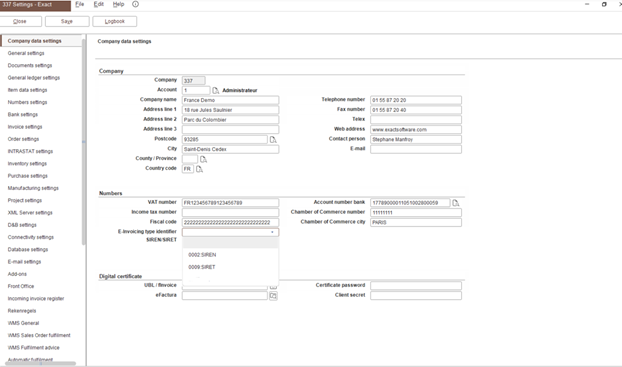
Select E-invoicing type identifier “0002” and enter a valid Company SIREN number
(9 digits) in the SIREN/SIRET number field.
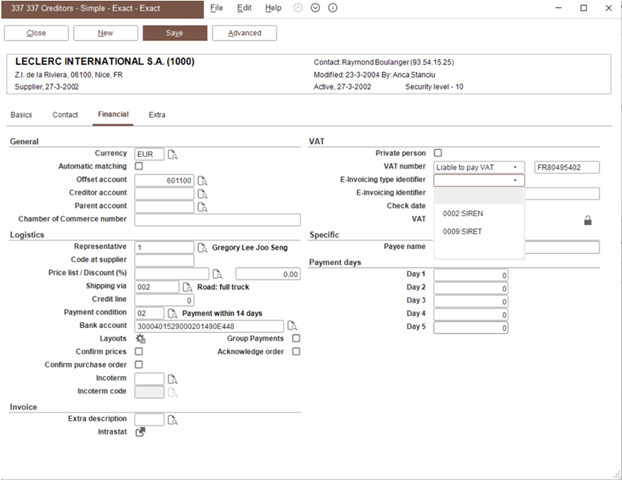
0002: SIREN and 0009: SIRET options
The 0002: SIREN and 0009: SIRET options have been added at the E-Invoicing type identifier field in the following screens:
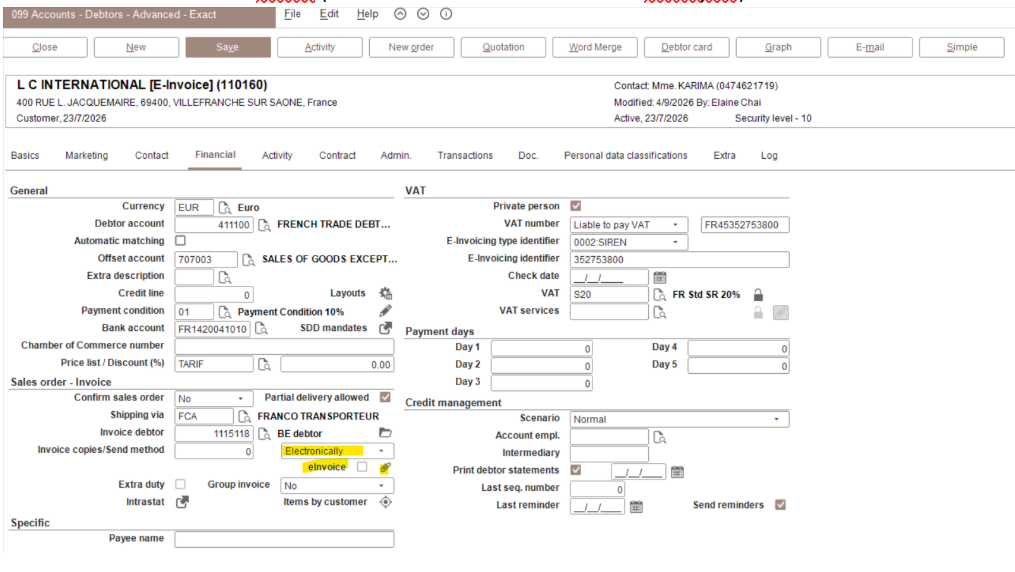
Debtor maintenance
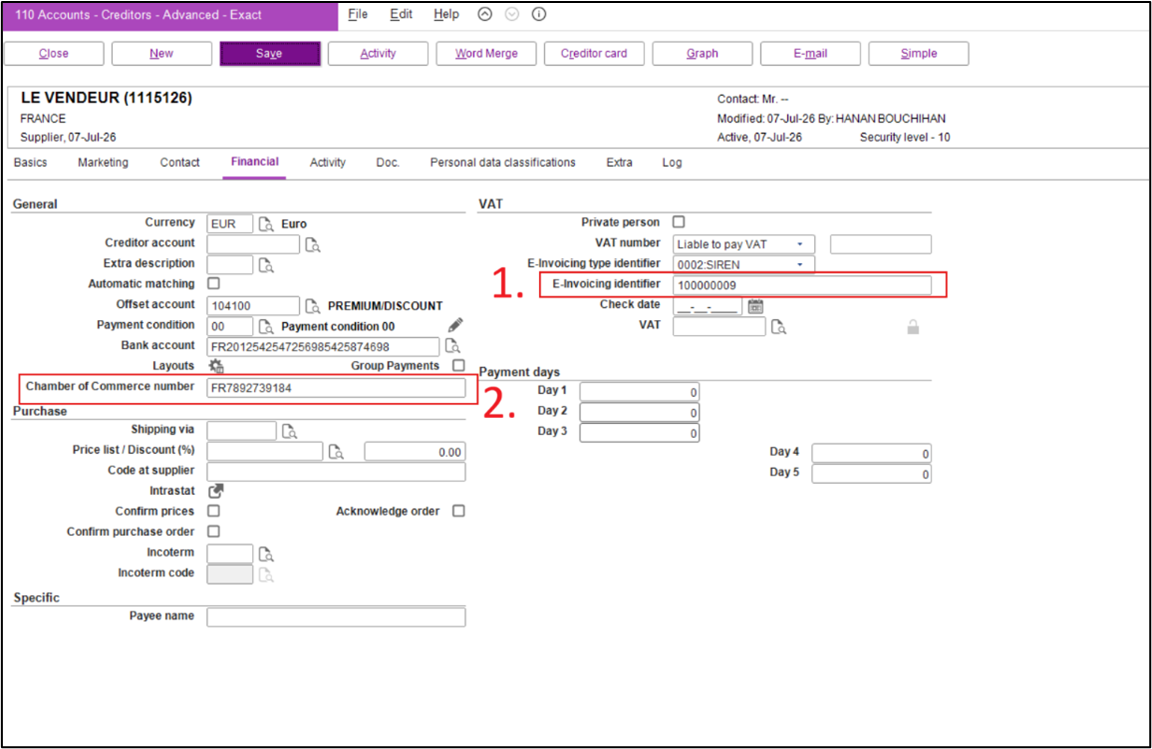
If the debtor only contains the SIREN number, select 0002: SIREN at E-Invoicing type identifier and the 9-digit at E-Invoicing identifier. If the debtor consists of a single SIRET or multiple SIRET number or routing code, select 009: SIRET at E-Invoicing type identifier and the 14-digit or more at E-Invoicing identifier.
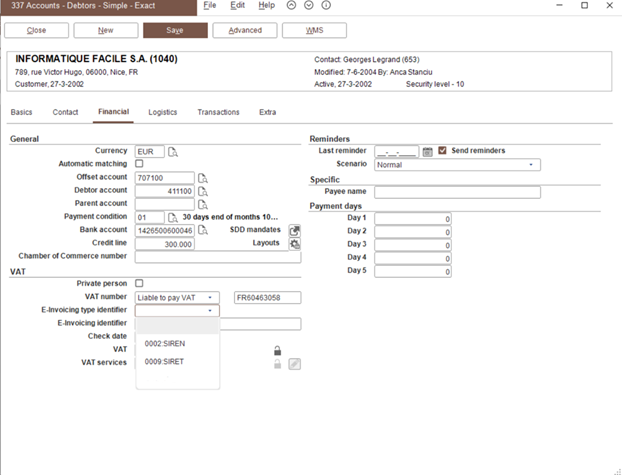
Define multiple routing code at E-Invoicing identifier for SIRET 009
Based on the French e-Invoicing specifications, the electronic routing address is not limited to a single identifier but may be structured in different ways depending on the recipient’s organisation.
In Exact Globe+, you are required to define the routing code at E-Invoicing identifier with the format below using the 0009 option at E-Invoicing type identifier.
| E-Invoicing type identifier |
Type |
E-invoicing identifier |
| 009 |
<SIRET> |
23668276100226 |
| 009 |
<SIREN>_<SIRET> |
236682761_ 23668276100226 |
| 009 |
<SIREN>_<SIRET>_<RoutingCode> |
236682761_ 23668276100226_BAS |
| 009 |
<SIREN>_<Suffix> |
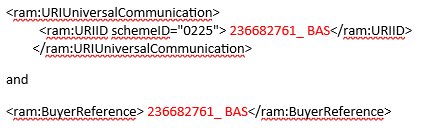
236682761_ BAS |
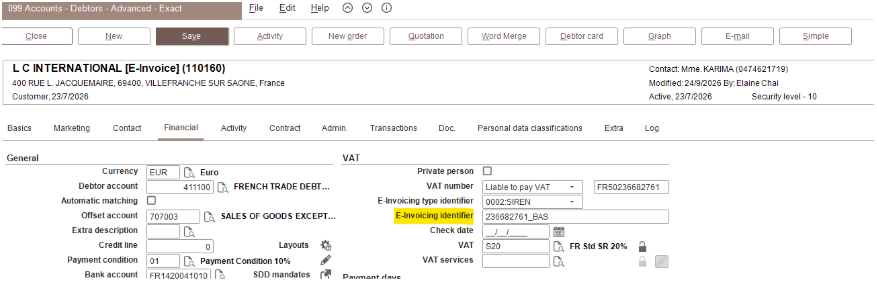
This logic will determine the value in:

The E-Invoicing identifier value will be routed to:
Send method is electronically
The eInvoice checkbox will be enabled if Email is selected at Send method. If Electronically is selected at Send method, Factur-X will be generated when processing the invoice and the invoice will be sent to DGFiP (Direction Générale des Finances Publiques) through the API.
Creditor maintenance
Conditions screen
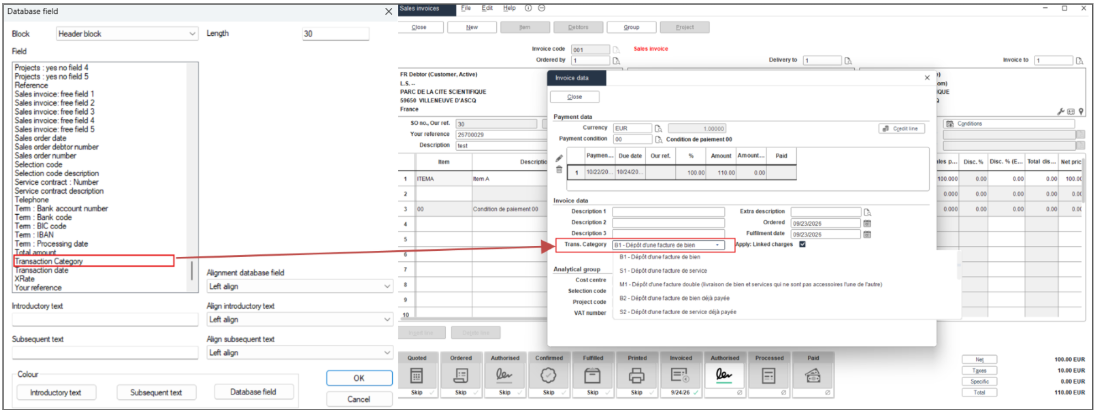
The Trans. Category field has been added under the Invoice data section in the Conditions screen at and . The options will be displayed based on the invoice debtor country code. The options below will be displayed if the invoice debtor is “FR” (for B2B domestic).
| Code |
Description |
| B1 |
Dépôt d'une facture de bien |
| S1 |
Dépôt d'une facture de service |
| M1 |
Dépôt d'une facture double (livraison de bien et services qui ne sont pas accessoires l'une de l'autre) |
| B2 |
Dépôt d'une facture de bien déjà payée |
| S2 |
Dépôt d'une facture de service déjà payée |
| M2 |
Dépôt d'une facture double déjà payée |
| S3 |
Dépôt d'une facture de service de sous-traitance avec paiement direct |
| B4 |
Dépôt d'une facture définitive (après acompte) de bien |
| S4 |
Dépôt d'une facture définitive (après acompte) de service |
| M4 |
Dépôt d'une facture définitive (après acompte) double |
| S5 |
Dépôt par un sous-traitant d’une facture de service |
| S6 |
Dépôt par un cotraitant d’une facture de service |
| B7 |
Dépôt d'une facture de bien ayant fait l'objet d'un e-reporting (TVA déjà collectée) |
| S7 |
Dépôt d'une facture de service ayant fait l'objet d'un e-reporting (TVA déjà collectée) |
The options below will be displayed if the invoice debtor is not “FR” (for B2B foreign) or Private person is selected for the invoice debtor (for B2C).
| Code |
Description |
| TLB1 |
Livraisons de biens soumises à la taxe sur la valeur ajoutée |
| TPS1 |
Prestations de services soumises à la taxe sur la valeur ajoutée |
| TLB1 + TPS1 |
Les opérateurs doivent distinguer les LB et les PS en e-reporting B2C (cf. lignes de facture) |
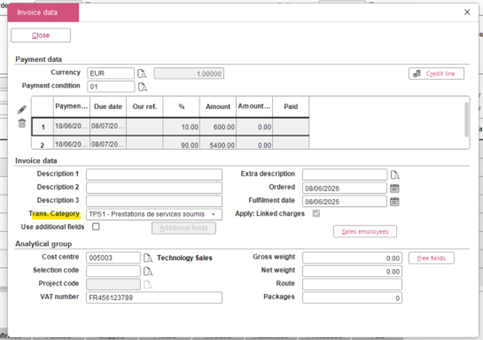
Goods or Services must be selected at Classification ESL in the Item maintenance. The default value in the Trans. Category field S1 for B2B domestic if the first item in the Invoice entry's Classification ESL is Services, and TPS1 is displayed for B2B foreign or B2C.
If the Classification ESL is not defined for the first item in the Item maintenance in the invoice entry, Goods (for example, B1 for B2B domestic and TLB1 for B2B foreign or B2C) is displayed.
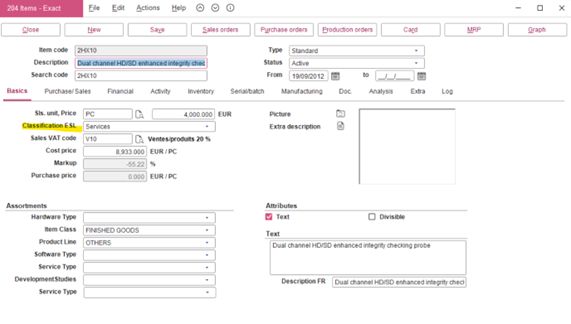
The default value in the Trans. Category field is determined by the first item line in the invoice to determine if it is B1/S1 or TLB1/TPS1.
VAT code maintenance
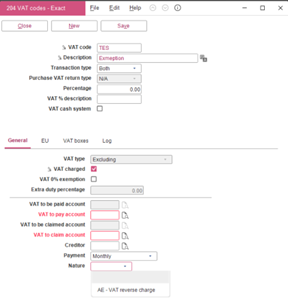
The Nature field is available in the VAT codes screen. This field displays the VAT category, and the options will be taken from the TaxNature.xml file in the XML folder.
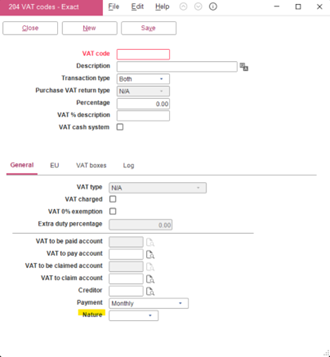
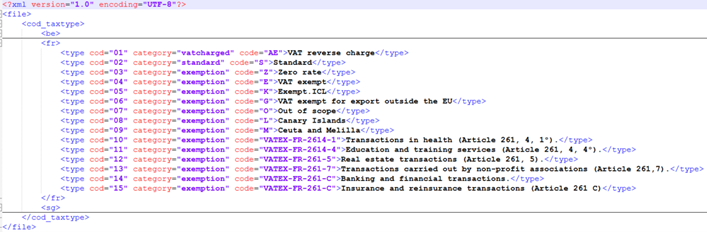
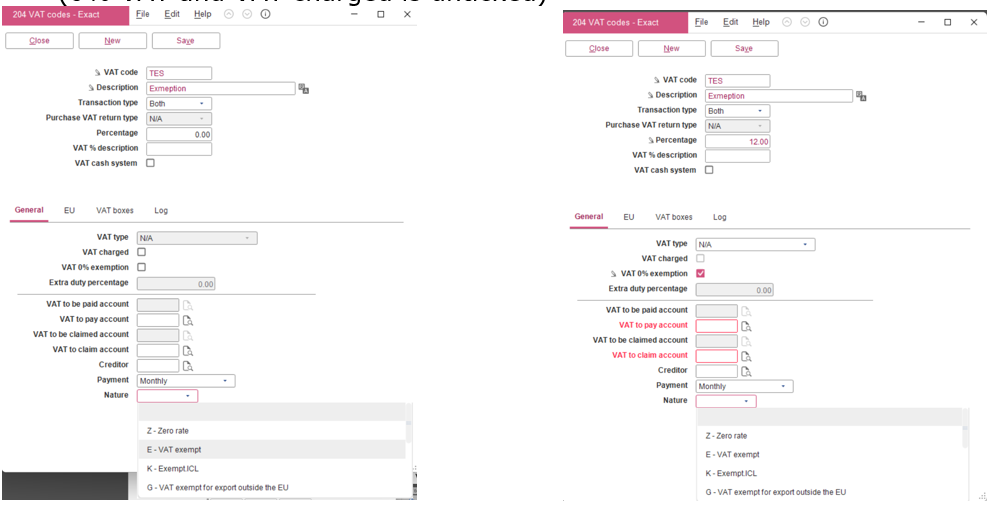
The options in the Nature field are displayed based on the following conditions:
-
Category is exemption – VAT 0% is selected (regardless of percentage value) or 0% VAT and VAT charged is not selected.
-
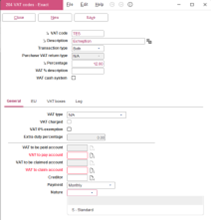
Category is standard – VAT 0% is not selected and VAT is not 0%.
-
Category is VATCharged – VAT 0% and VAT charged are selected.
Debtor maintenance
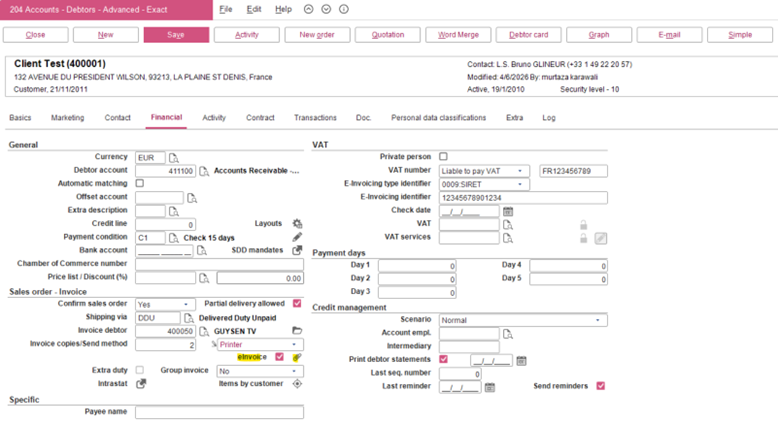
The eInvoice checkbox in the debtor maintenance will always be enabled for all sending methods. If Electronically is selected at Send method, the e-Invoice will be sent to the PA (Approved Platforms) during the final processing of the e-Invoice. If Printer or Email is selected at Send method, the e-Invoice will not be sent to PA for submission.
Validation on company and debtor participant number
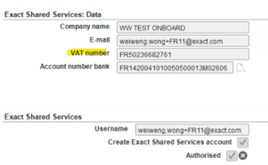
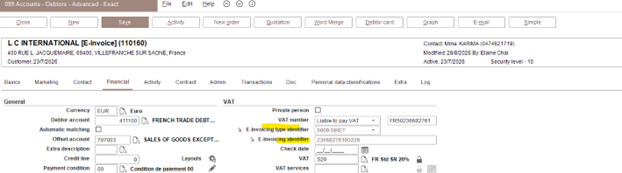
During the invoice process, IGW will validate the participant number of the company with the buyer’s participant number before the invoice is sent. If the participant number does not match, an error message will be displayed. Example of participant number is 0002:36682761 (0002 + last 9 digit of VAT).
The following image shows the company participant number:
The following image shows the debtor participant number:
The following image shows the error message:
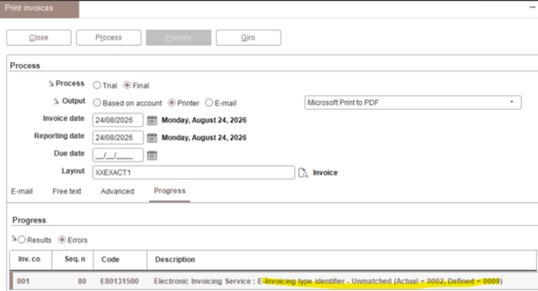
You have to return to the debtor maintenance and correct the E-invoicing type identifier to 0002 to match the actual registered identifier before proceeding to process the invoice.
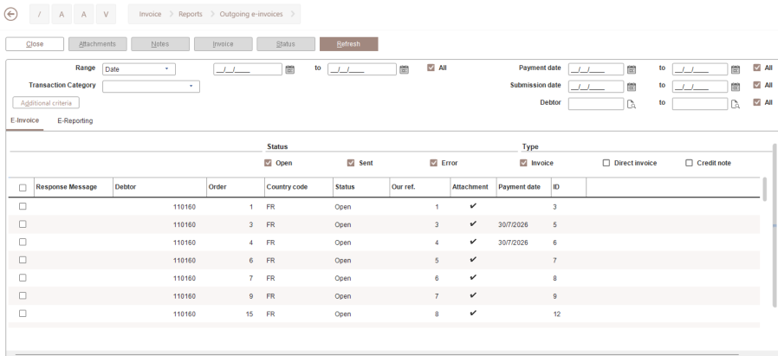
Status button introduced in the Outgoing e-Invoices screen
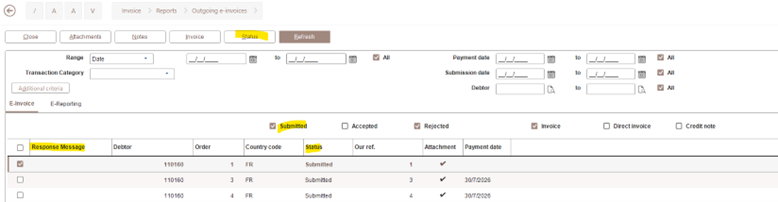
The Status button is added in the Invoice > Reports > Outgoing e-Invoices screen. The Status button allows you to update the status from the Approved Platforms (PA) if the return status is not immediate during the invoice process.
The status checkboxes and column have been changed to Open, Sent, and Error.
Invoice layout
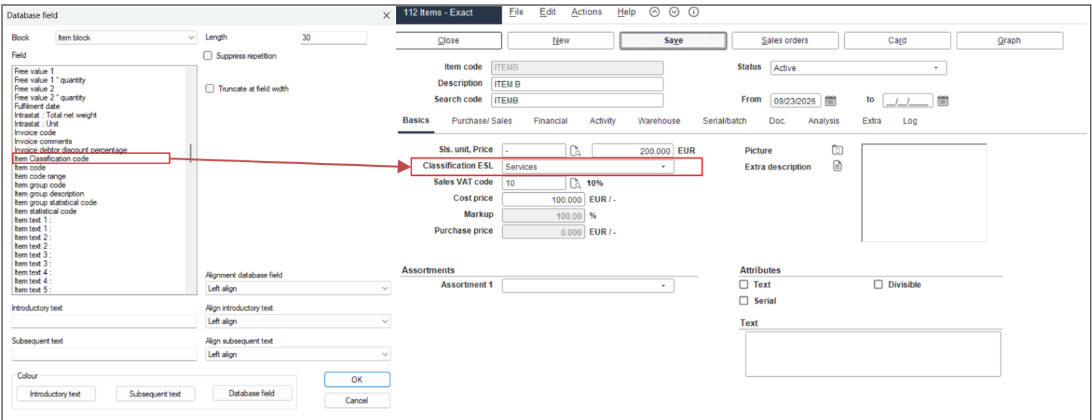
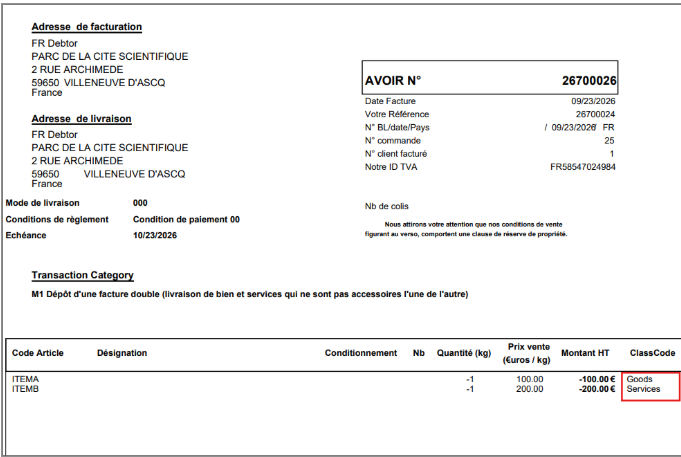
The Transaction Category and Item Classification code fields are added in the invoice layout at .
The Transaction Category field at the header block is mapped to the transaction category selected in the invoice condition screen. The selected transaction category code and description will be printed on the invoice layout.
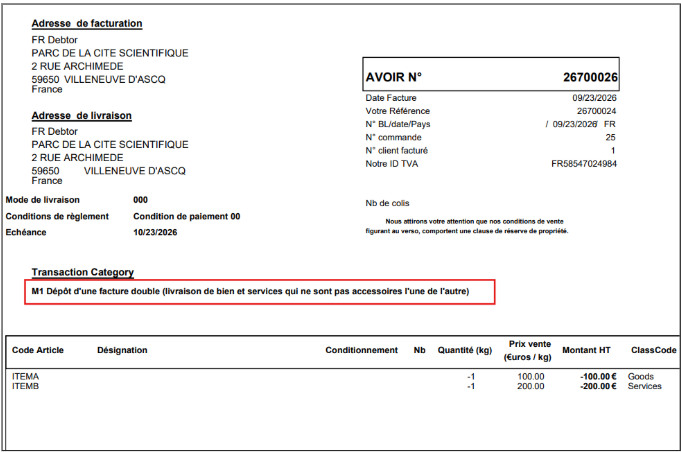
The Item Classification code field at the item block is mapped to the Classification ESL field in the item maintenance. If Classification ESL is blank, Goods will be displayed by default in the layout.
Generating e-invoices
A generated e-invoice generated is compliant with Factur-X (PDF/A-3). The embedded factur-x.xml file will contain a structured XML representation of the invoice data, whereby the XML file will be automatically embedded into the PDF during the final invoice processing with the Email and eInvoice checkboxes selected or based on the account (with Send method set to Electronically or Email with the eInvoice checkbox selected in the debtor maintenance) as a CII format e-Invoice. PDF will be generated without embedded XML for trial prints.
The embedded XML will follow the FRCIIExport.xsl stylesheet. The PDF file name will be <InvoiceNumber>_<InvoiceDate>(yyyyMMdd).pdf.
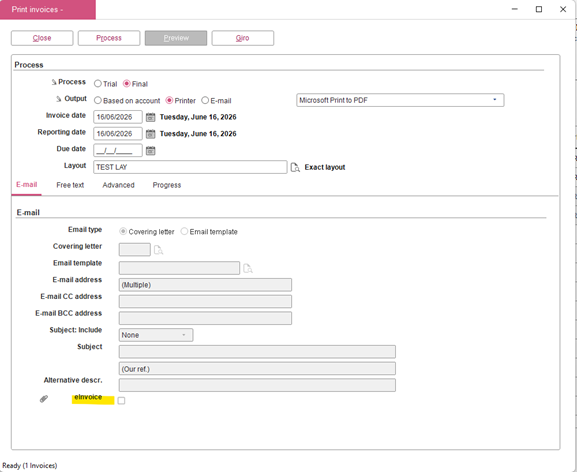
Select the Include additional attachment in XML checkbox to include additional attachments in the e-Invoice XML. If this checkbox is not selected, only one PDF attachment will be included in the XML.
Note: The Include additional attachment in XML checkbox is not available for product update 506.
e-Invoice XML mapping to the VAT CategoryCode
If the Nature field in the VAT code is not defined, the following VAT CategoryCode are used:
-
AE – VAT charged is selected (ExemptionReason is Reverse charge)
-
S – Percentage is not equal to 0
-
E – Percentage is equal to 0 and VAT 0% exemption is selected (ExemptionReason is Exempt)
-
K – Percentage is equal to 0 and EU sales list is not “No listing” under the EU tab
-
Z – Percentage is equal to 0
The ExemptionReason is determined based on the codes below followed by the CategoryCode:
-
AE – Reverse charge
-
E – EXEMPT
-
K – ICL
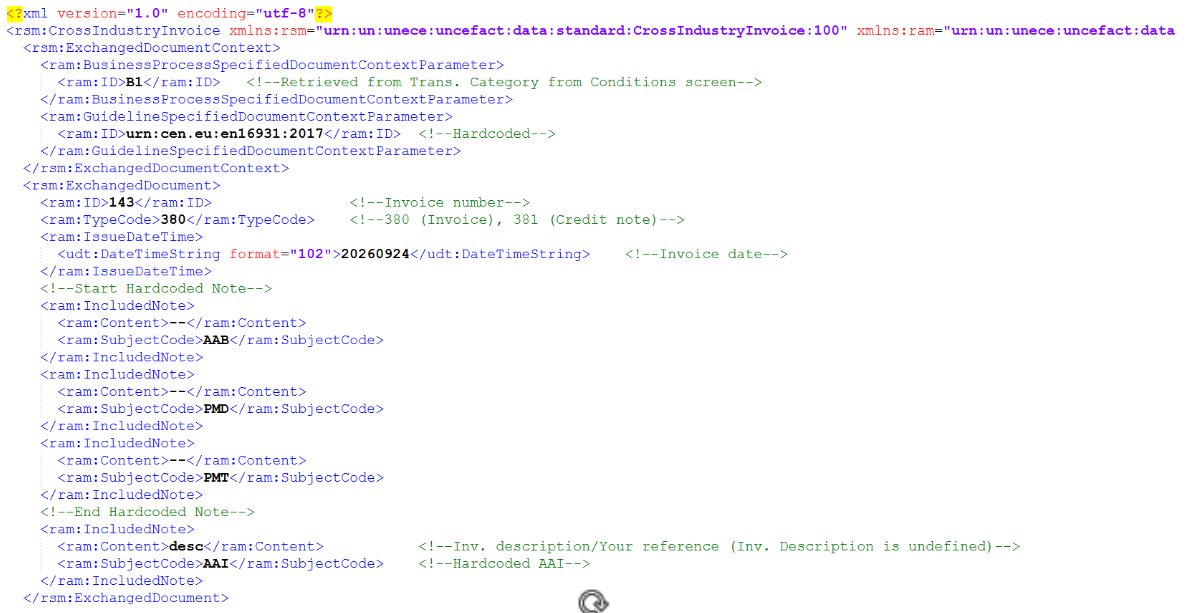
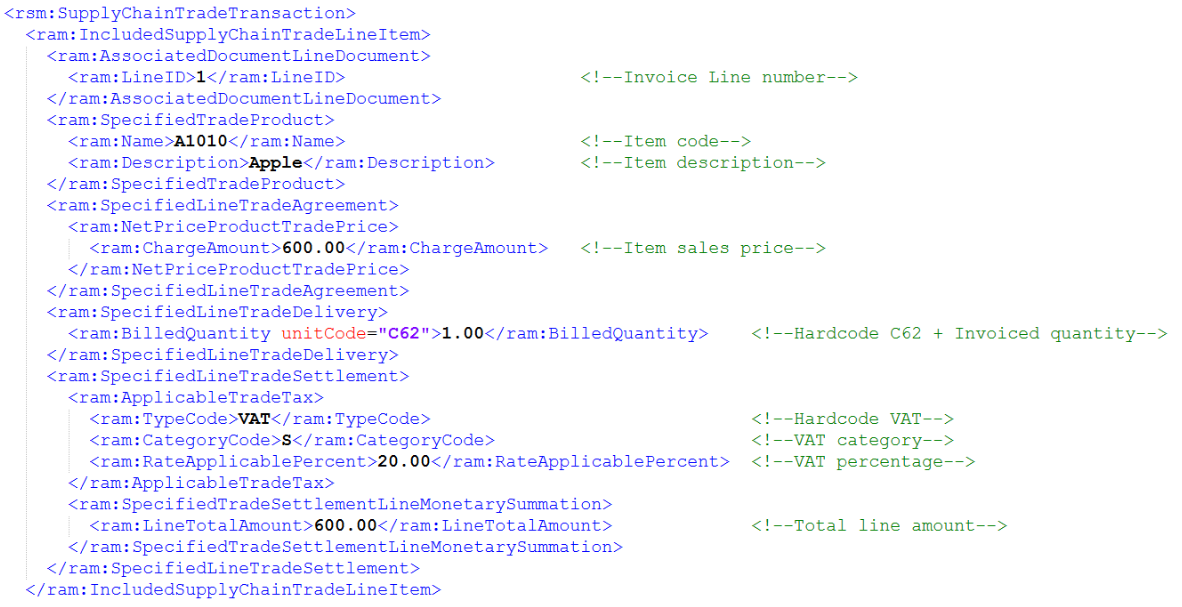
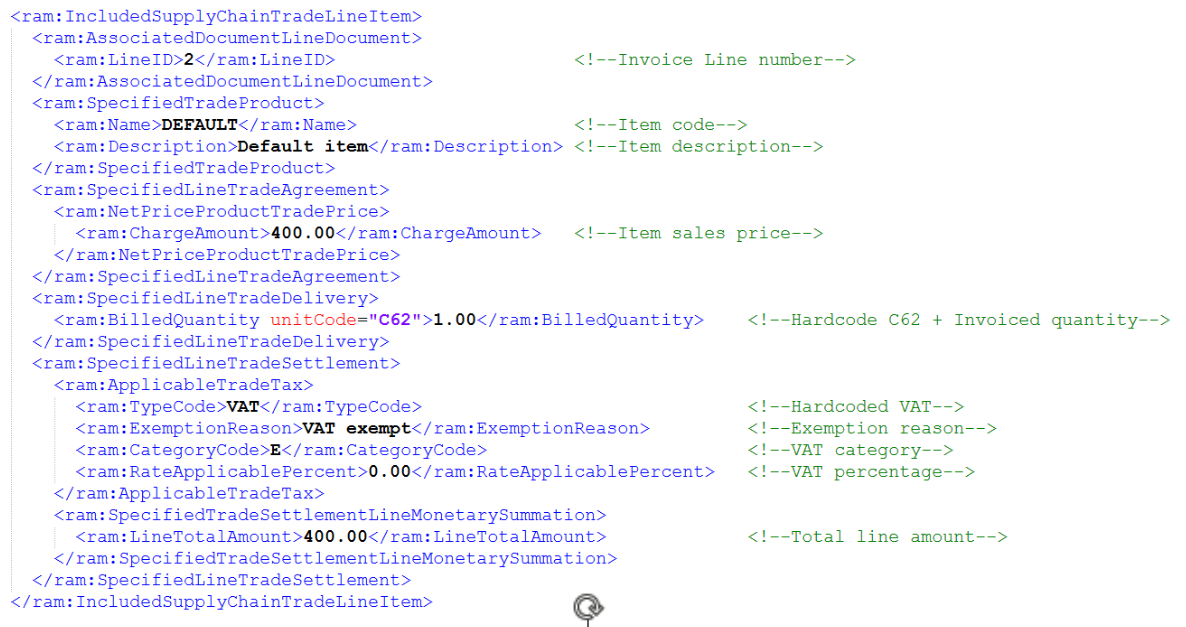
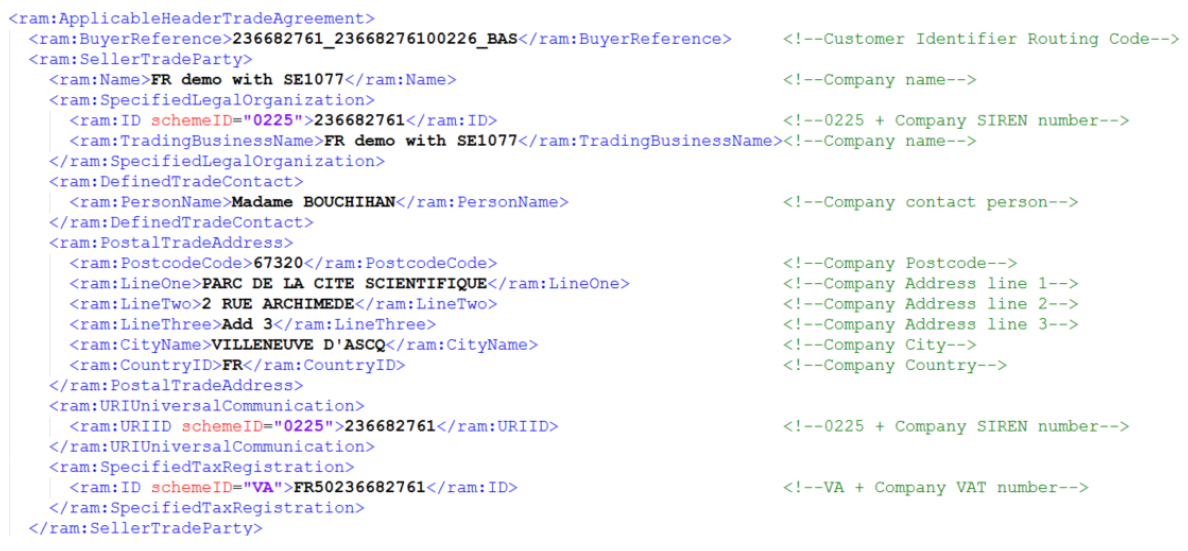
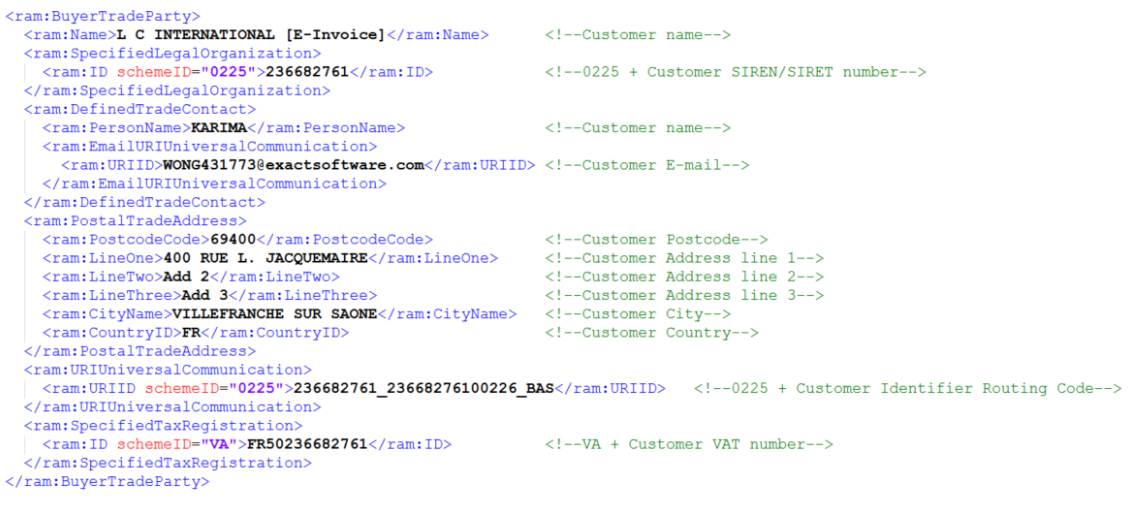
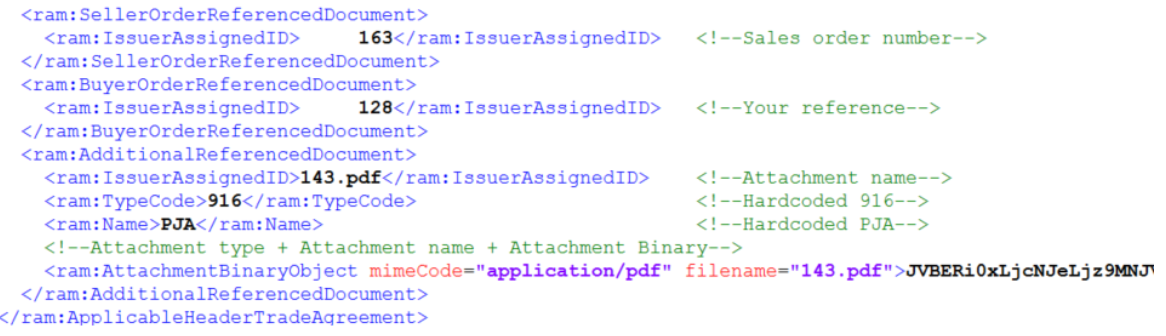
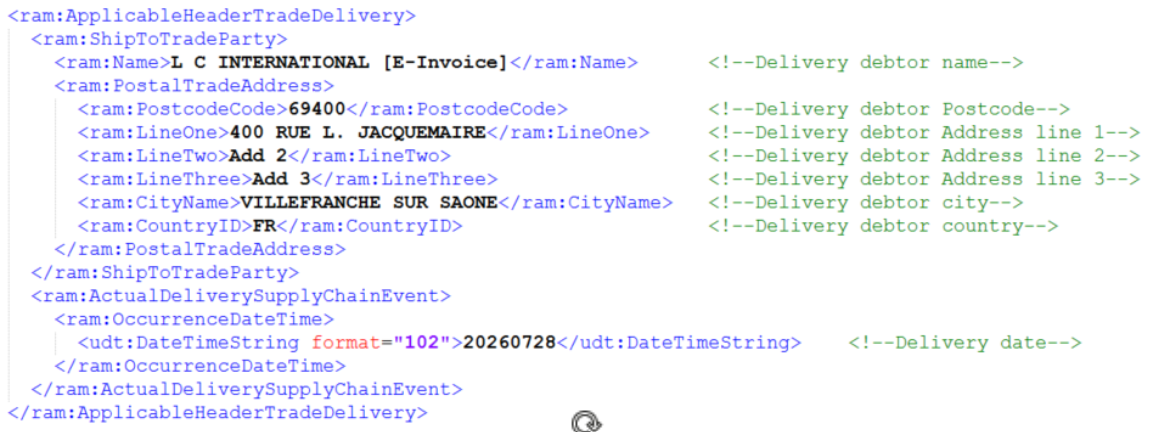
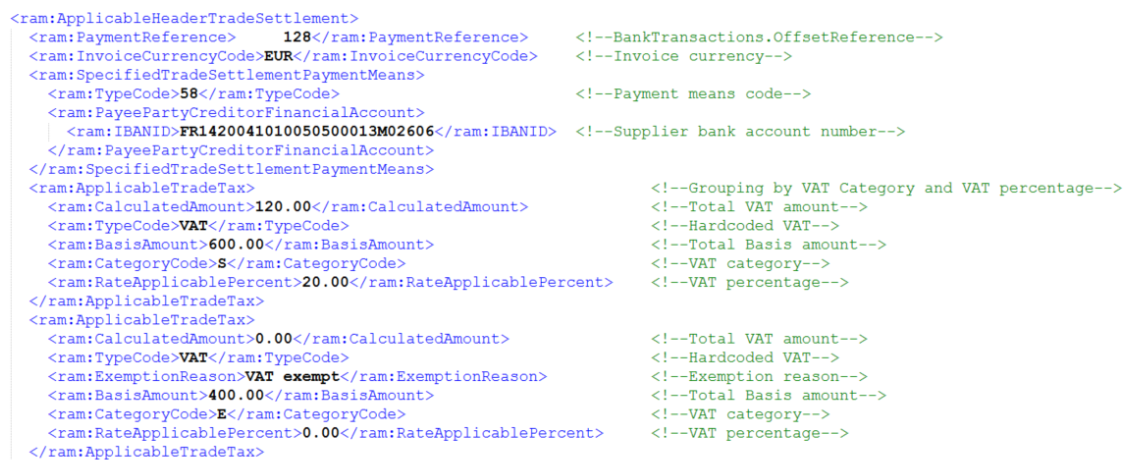
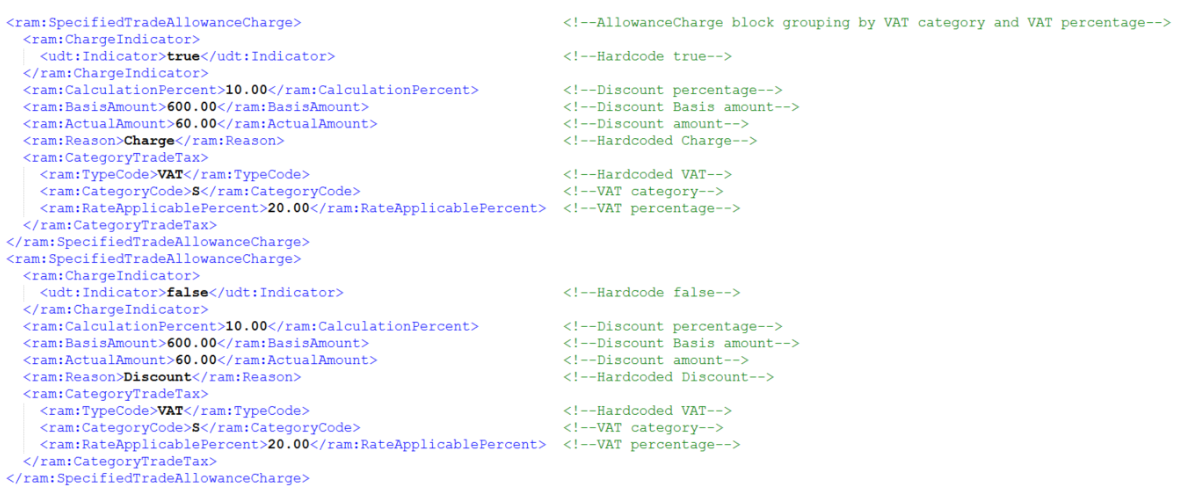
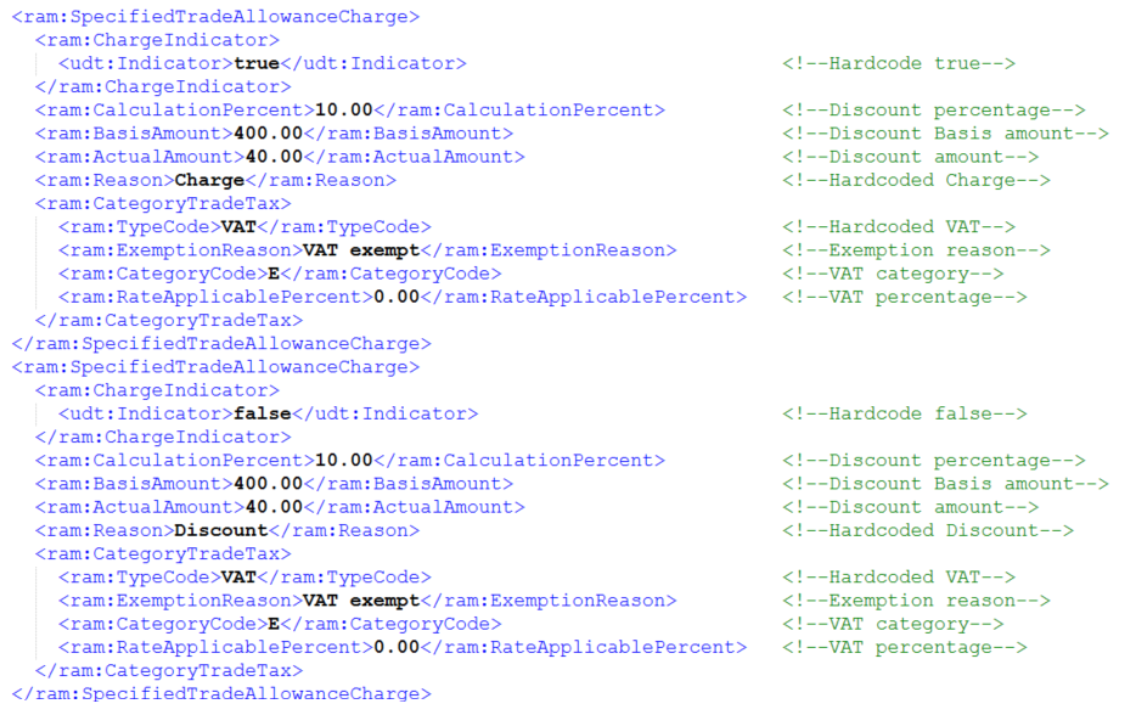
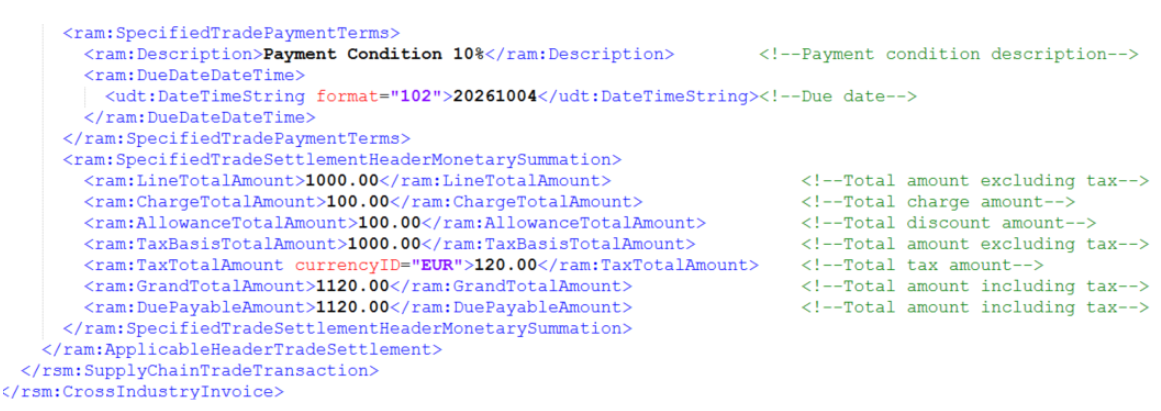
Additional <InvoiceReferencedDocument> block will be displayed when the credit note XML is generated. This will reference back to the original sales invoice number.

If the Include additional attachment in XML checkbox is selected in the Print invoice screen, multiple attachments will be included in the XML.
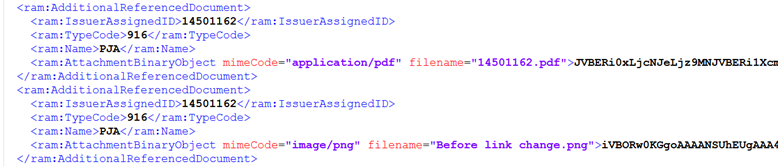
The following formats are supported for the attachments:
- jpg and jpeg
- png
- pdf
- csv
- xlsx
- ods and docx
Importing Factur-X, CII and UBL XML (manually)
You can select a PDF or XML file at Finance > Entries > Purchase and import the Factur-X PDF, CII, and UBL XML files into Exact Globe+.
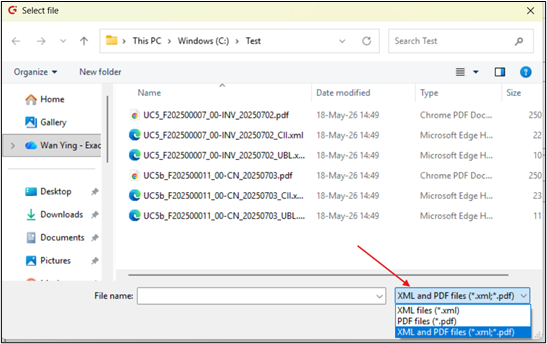
When importing an e-Invoice, the system will check whether the <ram:SpecifiedLegalOrganisasation>/<ram:ID> value is in the XML file or the XML that was embedded in the PDF file. This value is used to identify the creditor based on the following priority:
- The value is matched with the value in the E-Invoicing Identifier field for the creditor.
- If there are multiple attachment blocks in the XML, all the attachments in the purchase entry will be included.
Electronic invoice sending process
Electronic sending is available when the debtor’s send method is Electronically. However, the conditions below must be met:
-
Company has completed the onboarding.
- Send method in the debtor maintenance is Electronically.
- Based on account is selected when the invoice is processed.
You can check the status of the processed invoice at .
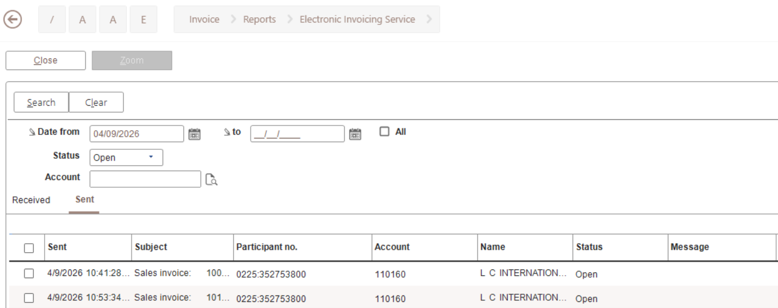
Sent invoices will be displayed at .
CDAR 47 Payment Received 212 lifecycle messages
Payment received
The CDAR 47 Payment Received lifecycle message is generated to notify the French Tax Authority when the eligible payment (cash-based VAT) is received and applied to a debtor invoice. This message is based on the 212 status in the French e-Invoicing lifecycle and confirms that the supplier or invoice issuer has received full or partial payment, marking the completion of the payment event for the invoice lifecycle. Reporting status 212 to the Public Invoice Portal (PPF) is mandatory only for businesses operating under a cash-based VAT regime where VAT becomes due upon payment collection rather than invoice issuance. The CDAR 47 generation is a matching process in which a payment transaction is matched to a sales invoice or prepayment invoice through manual or bank import matching. CDAR 47 can also be generated when the existing payment match is reversed through unmatching, irreconciliation, or unlink actions. Based on the match, the system evaluates the applicable payment amounts and generates the CDAR 47 XML message for reporting purposes. The message supports the French cash-based VAT reporting requirements by reporting the portion of the payment amount attributable to the invoice lines that are subject to cash-based VAT.
CDAR settings
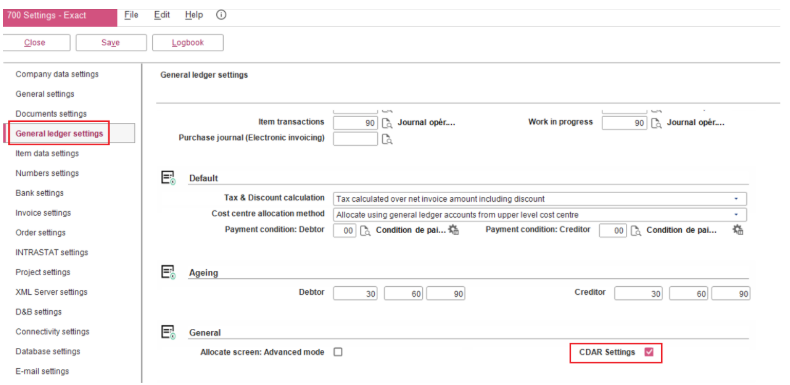
A new CDAR Settings checkbox has been added to the General ledger settings at . If this checkbox is selected, the system generates and sends a CDAR XML message during payment matching and unmatching processes. If the checkbox is not selected, no CDAR XML messages are generated or sent.
CDAR XML generation
The CDAR generation functionality only applies to the following scenarios:
-
Domestic B2B e-Invoices
-
Sales invoices with cash-based VAT that are matched or unmatched with payments
-
Sales invoices containing at least one entry line with a cash-based VAT code
-
Matching or unmatching between sales invoice (W term) and payment (S term)
The functionality does not apply to:
CDAR XML files are automatically generated for the following payment and matching scenarios:
-
Collections ()
-
Bank import ()
-
Manual matching ( and )
-
Bank or cash and general journal processing ( and )
-
Debtor card matching ()
CDAR file structure
One CDAR XML file is generated for each payment term (S term). When a single payment term is matched to multiple invoice terms (W terms), multiple invoice references are included within the <ram:ReferenceReferencedDocument> block of the generated CDAR XML. The number of <ram:ReferenceReferencedDocument> blocks corresponds to the number of matched invoices.
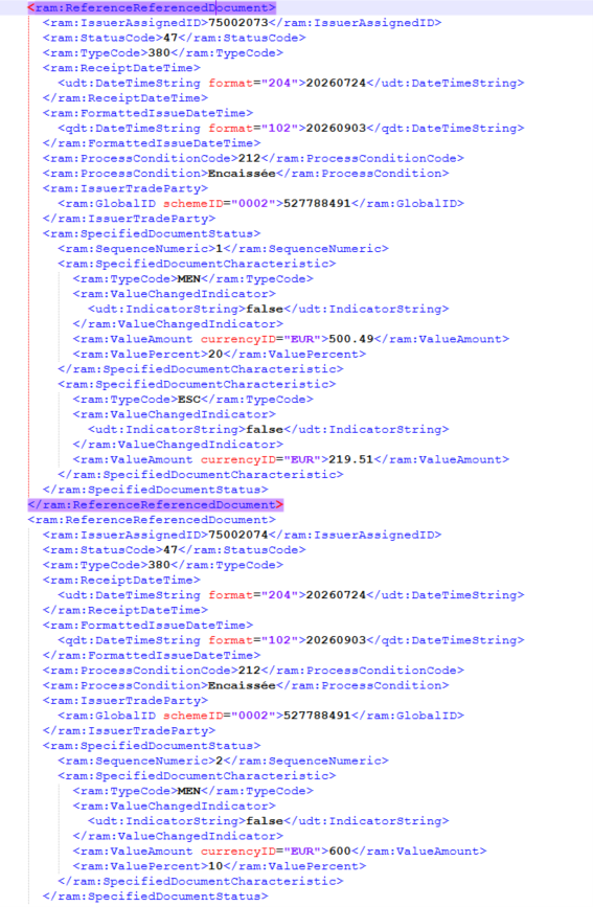
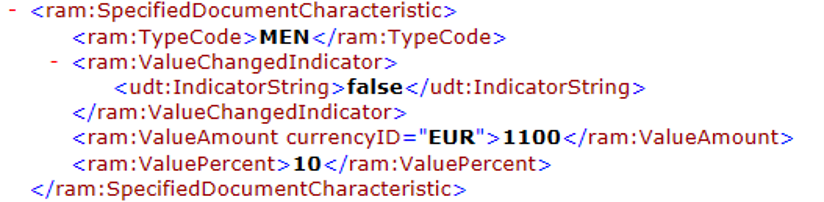
When generating CDAR, the system will create one or more <ram:SpecifiedDocumentCharacteristics> nodes and <ram:SpecifiedDocumentStatus> based on the cash-based VAT rates applicable to the invoice. For each cash-based VAT rate on the invoice, the system will generate the following:
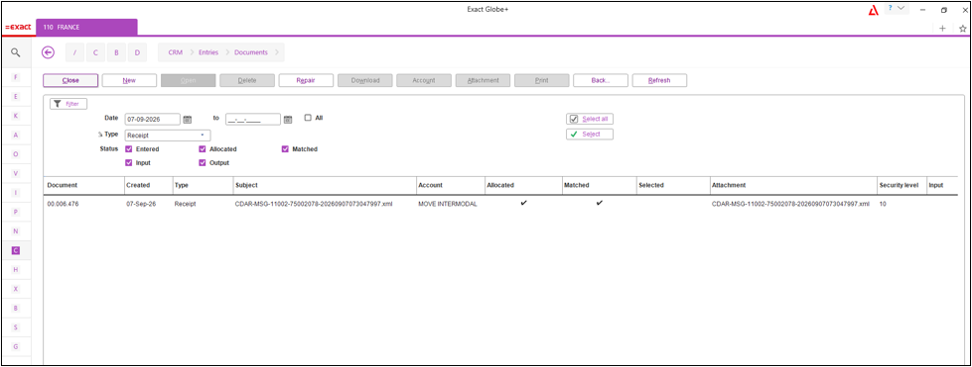
The CDAR XML file will contain the following filename:
-
Single payment – CDAR-MSG-DebtorNumber-InvoiceNumber-Payment datetime yyyyMMddHHmmss
-
Multiple payment – CDAR-MSG-DebtorNumber-MULTIPLE-Payment datetime yyyyMMddHHmmss
For more information on French e-Invoicing, see Introduction to French e-Invoicing (French legislation) and FAQ: e-Invoicing in Exact Globe+.
| Main Category: |
Attachments & notes |
Document Type: |
Release notes detail |
| Category: |
|
Security level: |
All - 0 |
| Sub category: |
|
Document ID: |
33.200.785 |
| Assortment: |
Exact Globe+
|
Date: |
09-10-2026 |
| Release: |
|
Attachment: |
|
| Disclaimer |