Office Add-in files
Introduction
During the installation of the Office add in some files are placed on the harddisk of the client machine. This document gives a list of the installed files and where the files are stored.
Explanation
The Office add in consist out of three files:
- SynergyOfficeAddin.INF
- SynergyOfficeAddin.dll
- eSynInt.dll
During the installation the files are stored in the following folders:
- SynergyOfficeAddin.INF --> Windows\Downloaded Program Files
- SynergyOfficeAddin.dll --> Windows\Downloaded Program Files
- eSynInt.dll --> Windows\System32
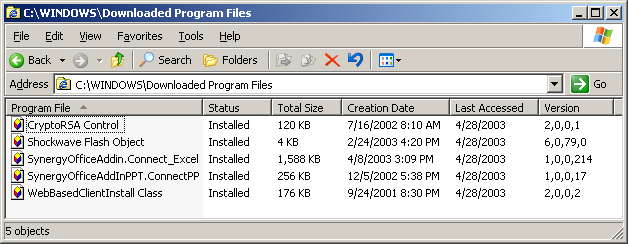
However, if a normal search is done on the SynergyOfficeAddin.dll the file is not found. This is caused by security settings of Windows which do not allow the user to see the contents of the 'Downloaded Program Files' - folder in a normal way.
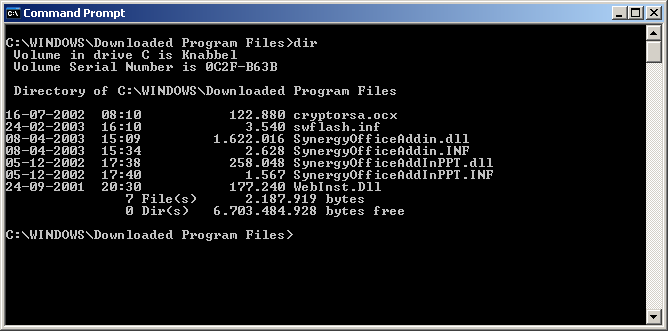
Looking to the same folder in DOS does show the files.
To look at the folder in the DOS prompt goto start/run. Enter ‘cmd’ and press OK. DOS prompt is now opened. Enter the next line: cd\ “windows\downloaded program files” and press enter.
Note
Windows Xp also has a folder called 'Windows\LastGood\Downloaded Program Files' where a copy of downloaded dll's is maintained. The existance of this copy can be the reason for a failing installation.
| Main Category: |
Support Product Know How |
Document Type: |
Support - On-line help |
| Category: |
On-line help files |
Security level: |
All - 0 |
| Sub category: |
Details |
Document ID: |
03.599.851 |
| Assortment: |
Exact Synergy
|
Date: |
16-03-2017 |
| Release: |
|
Attachment: |
|
| Disclaimer |