Diacritical symbols in e-Synergy
Diacritical
symbols are supporting reading symbols. You can think for example of of ï,à,ë and è. These symbols are created by several combinations of the
‘Alt-button’ and a figure. Also there’s a possibility to insert a symbol within
MS Word. Click on 'Symbol' like you see below and a popup will appear.
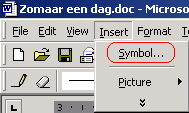
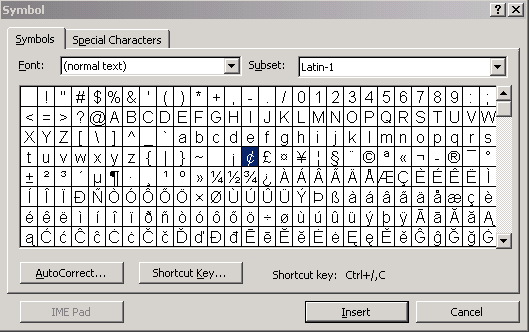
All
these diacritical symbols are supported within e-Synergy. You can insert them in
MS Word and after that copy them into e-Synergy, or you can directley create
them within e-Synergy by using the combinations for every symbol. (ALT+
...)
In e-Synergy you can use them in the textfield when
creating a document, but more important is the fact that you can also use the
diacritical symbols within for example subject-, name- and search fields. By
using diacritical symbols, names can be spelled correctly.
How you can find the symbols
within Windows, is described below. A popup window will appear. From there you can select
a symbol and past it into a document. Follow the next path within
Windows; Start - All Programs - Accessories - System Tools - Character Map.
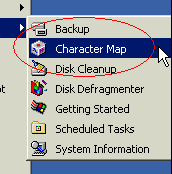
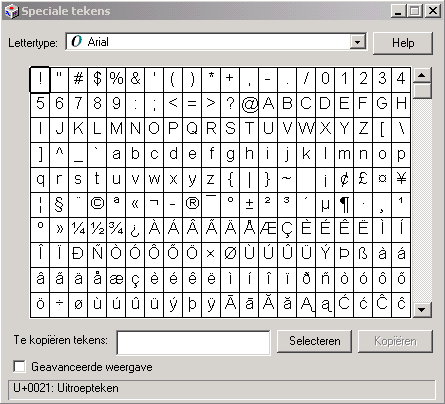
From there you can copy and paste the
symbols.
| Main Category: |
Support Product Know How |
Document Type: |
Support - On-line help |
| Category: |
On-line help files |
Security level: |
All - 0 |
| Sub category: |
General |
Document ID: |
01.339.055 |
| Assortment: |
Exact Synergy
|
Date: |
19-05-2018 |
| Release: |
|
Attachment: |
|
| Disclaimer |