In Exact Globe, the electronic banking functionality supports various bank formats for Rabobank, namely the generation of bank files for domestic and international payments, domestic collection, and the import of bank statements.
Recently, Rabobank has implemented an automatic exchange of bank payment files, collection files, and statement files directly with customers, which requires minimal manual intervention. Exact Online has become the first software solution in the Dutch market to support Rabobank’s new service. In line with this, Exact Globe will incorporate a similar facility to enable the automatic exchange of bank files.
The automatic exchange of bank files shall be possible between Exact Globe and Rabobank via an electronic integration platform. This is only applicable to the Dutch legislation. This functionality is not applicable for customers with Compact license of Dutch legislation.
The following prerequisites must be adhered to:
- A set of electronic services login credentials are required and must be registered in Exact Globe.
- The digital postbox of the administration and Rabobank must be registered.
The following changes have been implemented:
Electronic services registration information
The goal of this function is to register the login information and to enable the automatic exchange functionality for electronic banking.
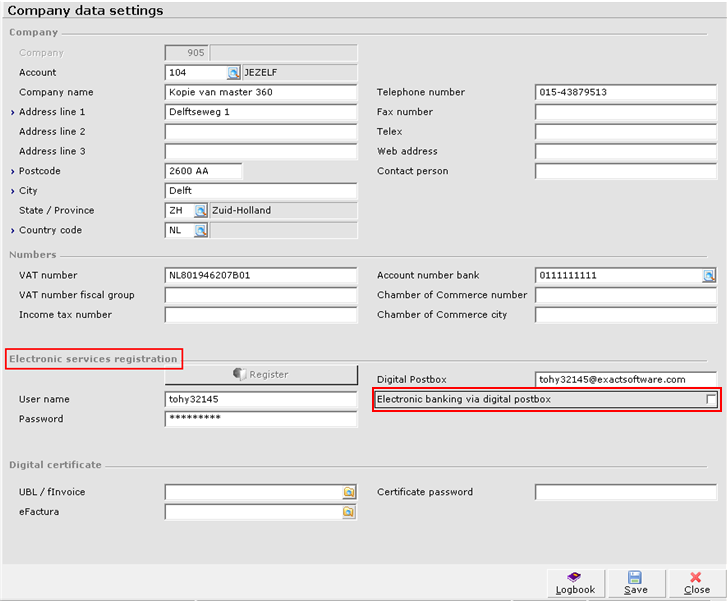
In Company Data Settings, the section Electronic invoicing is renamed Electronic services registration to reflect the added functionality of automatic exchange of Rabobank’s bank files.
Note: The login information in User name, Password, and Digital Postbox are applicable for both electronic invoicing and automatic exchange of Rabobank’s bank files in the case of Dutch legislation only. In the case of Belgium legislation, the setting name change is applicable also. However, in such case, this setting is valid for the electronic invoice functionality only.
An Electronic banking via digital postbox check box is added under the Electronic services registration section. You can select this check box to enable the electronic banking functionality via the automatic exchange for your administration. This check box is enabled when the relevant information in User name, Password, and Digital Postbox are defined. Once you save the relevant information, a connection is made to the electronic services platform for the file exchange.
Following the above process, the system will automatically replicate any Rabobank cash instruments which already exist in Exact Globe to the electronic services platform. This automatic process is triggered once only upon saving. Subsequent cash instruments created after this automatic process will have to be replicated individually as described in the Replication of cash instruments section.
Top
Replication of cash instruments
The goal of this function is to enable the replication of cash instruments from Exact Globe to the electronic services platform. This is done at Creating and Maintaining Cash Instruments.
The following prerequisites must be adhered to:
- You have Rabobank cash instrument.
- Country code of the cash instrument is NL (Netherlands).
- Currency code of the cash instrument is EUR (Euro).
- The Electronic banking via digital postbox check box under the Electronic services registration section in Company data settings is selected.
- The Digital Postbox under the Invoice section in the Financial tab of the Rabobank creditor must be defined in the creditor maintenance.
Upon saving the new cash instrument, the replication process will automatically copy and create the cash instrument. During the replication, the necessary corresponding information of the cash instrument, such as bank journals and G/L accounts, will also be created concurrently.
Top
Replication of bank links
The goal of this function is to enable the replication of bank links information for the Rabobank accounts to Exact Globe.
The following prerequisites must be adhered to:
- You have Rabobank cash instrument.
- Country code of the cash instrument is NL (Netherlands).
- Currency code of the cash instrument is EUR (Euro).
- The Electronic banking via digital postbox check box under the Electronic services registration section in Company data settings is selected.
- The Digital Postbox under the Invoice section in the Financial tab of the Rabobank creditor must be defined in the creditor maintenance.
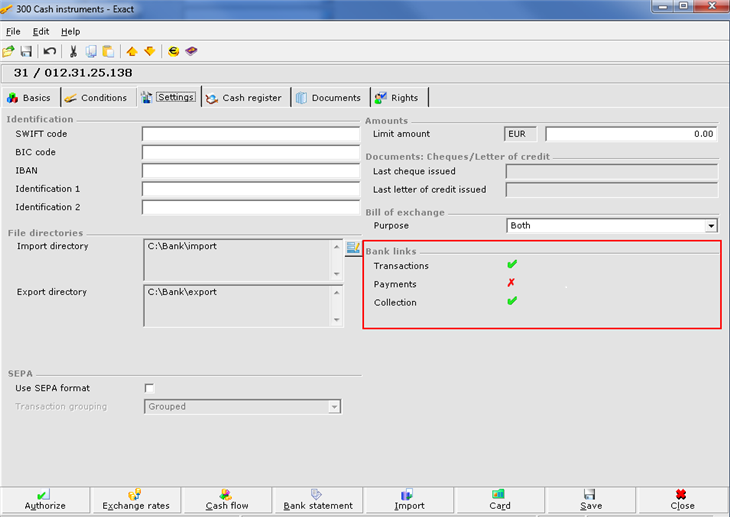
In Creating and Maintaining Cash Instrument – Settings Tab, a new Bank links section is added. This section displays information retrieved from Rabobank on the bank links and cannot be edited here. Bank links refer to the type of services supported by the automatic exchange functionality for that particular cash instrument.
The Bank links section is only available when the above prerequisites are fulfilled. The bank links information is retrieved and updated automatically when you run either import or export for the first time on any particular day. This process is only applicable when you run the import or export for any Rabobank accounts which meet the prerequisite.
Top
Export of payment and collection files
The goal of this function is to automatically export payments and collection files. This is done when you click Export at Processing Payment and Viewing Payment for Collection.
The following prerequisites must be adhered to:
- Applicable for Rabobank when bank format is CLIEOP03.
- Country code of the cash instrument is NL (Netherlands).
- Currency code of the cash instrument is EUR (Euro).
- The Electronic banking via digital postbox check box under the Electronic services registration section in Company data settings is selected.
- The Digital Postbox under the Invoice section in the Financial tab of the Rabobank creditor must be defined in the creditor maintenance.
- Bank links are defined for the relevant cash instrument.
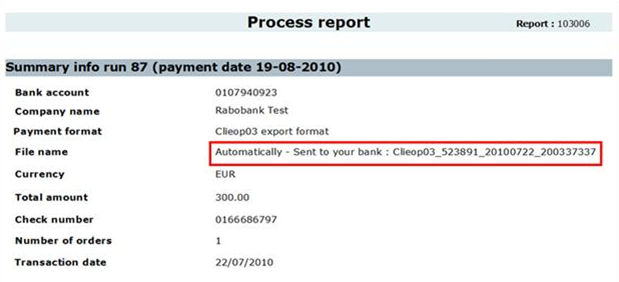
When you click Process before exporting the files, the system will first check if there are payments or collections for Rabobank. If all the prerequisites are adhered to, the bank file will be generated and sent to Rabobank's mailbox. Once the bank file is successfully delivered to the mailbox, a message will be displayed in the Process report as below:
If the connection fails, the process will be rolled back and the transaction terminated. A message “A connection problem has occurred. Please resume uploading.” will be displayed.
When exporting payment or collection files and if there are multiple terms selected with different bank accounts where at least one of the accounts is Rabobank with Payments or Collection defined as a bank link, the system will not proceed to generate the bank files. A message “Multiple: Bank accounts. Not supported for electronic banking via digital postbox.” will be displayed.
Due to the limitation in the Rabobank synchronized banking solution, the Exact Globe functionality supports only the direct export of domestic EUR payments via the digital postbox. International payments cannot be exchanged via the digital postbox and needs to be uploaded to Rabobank internet banking solutions manually.
The payments and collections can only be exchanged with Rabobank via the digital postbox in case when such operation is confirmed by Rabobank and reflected in the bank links. Otherwise, generated bank files still need to be uploaded to Rabobank internet banking solutions manually.
Top
Import of bank statement files
The goal of this function is to automatically import bank statement files from the electronic services platform. This is done when you click Import at Overview of Imported and To Be Imported Bank Statements and Creating and Maintaining Cash Instruments.
The following prerequisites must be adhered to:
- Applicable for Rabobank when bank format is MT-940.
- The Rabobank cash instrument has the Transactions bank link.
- Country code of the cash instrument is NL (Netherlands).
- Currency code of the cash instrument is EUR (Euro).
- The Electronic banking via digital postbox check box under the Electronic services registration section in Company data settings is selected.
- The Digital Postbox under the Invoice section in the Financial tab of the Rabobank creditor must be defined in the creditor maintenance.
Introduction of Method field
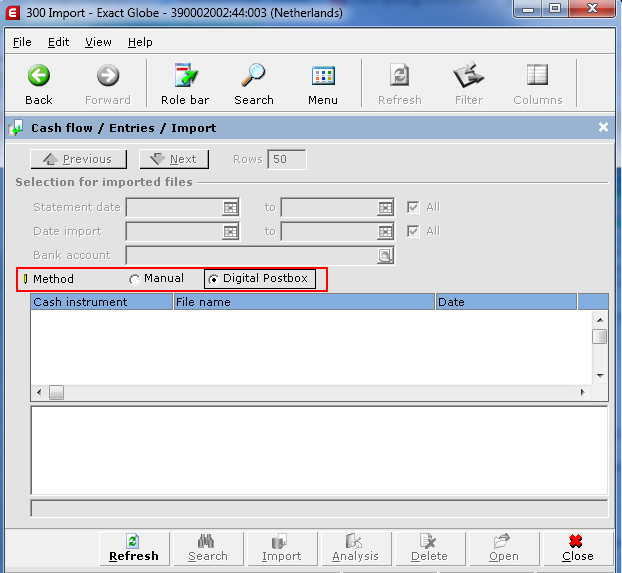
A new Method field is added under the Selection for imported files section with the options Manual and Digital Postbox. Method is only available when:
- You have Rabobank cash instrument.
- The Electronic banking via digital postbox check box under the Electronic services registration section in Company data settings is selected.
- The Digital Postbox under the Invoice section in the Financial tab of the Rabobank creditor must be defined in the creditor maintenance.
Method will still be available when none of the Rabobank cash instruments in your administration has the Transactions bank link. This is so that you can still trigger the bank links replication by refreshing the import screen under Digital postbox option. This scenario occurs when the bank link displayed in Exact Globe is “û”, while the bank link defined for Rabobank is “ü”.
If you click Manual, the existing functionality is applicable. If however you select Digital Postbox and click Refresh, the system will connect to the electronic services platform and retrieve new or open bank statements from the Digital Postbox account as defined in Company data settings. The bank files displayed will fulfill the following criteria:
- Only bank files pertaining to the relevant Exact Globe administration will be retrieved and displayed.
- Only bank files for bank accounts where the bank link Transactions is enabled will be retrieved and displayed.
Results section
After importing the bank files, the record will no longer be displayed in the results section of Digital Postbox. The imported records will be displayed in the results section of Manual instead. Also, there will not be any distinction between records imported via Manual or Digital Postbox.
In the results section, you will see the following information:
- The cash instrument number of the bank statement.
- The file name of the bank statement.
- The date the message was sent.
Buttons
The following buttons will be disabled when Digital Postbox is selected at Method:
- Search – Searching for files is no longer necessary. When you click Refresh, the system will automatically retrieve all the new bank statements from the electronic services platform which have not been imported to Exact Globe.
- Analysis – Transactions are not available for analysis since bank statements are not imported to Exact Globe.
- Delete – You are not allowed to delete bank statements which are located at the electronic services platform.
Top