Batch 270: XML schema documentation
A new feature has been added to the XML Homepage:
Documentation. You will find the link in the top right corner of the
page:

This documentation is dynamically generated to always reflect the latest
version of the XML schema. It shows the details of all elements and attributes
in the eExact-Schema such as datatypes, required attributes and
enumerations.
Tooltips are used throughout the document to provide extra information.
Notation used
Attributes can be optional or mandatory. They can occur only once within an
element. Optional attributes are shown enclosed by square brackets:
[optional].
For elements a minimum and a maximum number of occurrences can be specified.
The default for both is 1. Elements shown as <element> are mandatory and
can occur only once. In other cases the minimum and maximum number of
occurrences are shown as <element> (minimum,maximum). An unbounded maximum
is shown as a plus sign.
Model groups (all, choice and sequence) are shown with a tall square bracket
enclosing the elements they contain.
Examples:
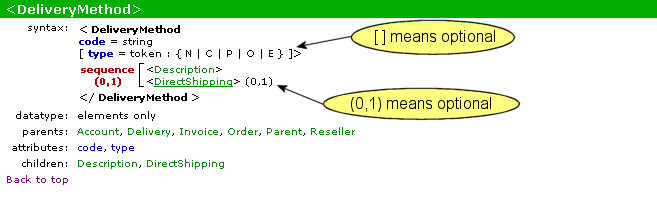
This shows the DeliveryMethod element. It has two attributes: code
and type. The code attribute is of type string and is mandatory. The type
attribute is of type token and is optional (indicated by '[ ]').
Inside the DeliveryMethod element
there is a sequence of elements. The
elements of a sequence have to occur in the order shown. The Description element is
mandatory within the sequence and is allowed only once. This is the default. The
DirectShipping element is optional here, and is allowed to occur only once, shown by
(0,1).
You can also see that the DeliveryMethod element itself can be used
within the Account, Delivery, Invoice, Order, Parent and
Reseller elements.

This shows the details of the type attribute of the
DeliveryMethod element. In the header the attribute name is shown with the
element name. This means the attribute only occurs inside this particular
element. The fact that it only has one parent confirms this.
Datatype token usually has an enumerated list of
possible values. These are shown between { }. The meaning of the
options is usually explained in the comments. These comments are shown
as a tooltip on the attribute name in the element syntax.
| Main Category: |
Support Product Know How |
Document Type: |
Release notes detail |
| Category: |
Release Notes |
Security level: |
All - 0 |
| Sub category: |
Details |
Document ID: |
01.397.019 |
| Assortment: |
Exact Synergy
|
Date: |
19-05-2018 |
| Release: |
|
Attachment: |
|
| Disclaimer |