Product Updates 417 and 416: Split payment functionality introduced (Italian legislation)
The split payment functionality is now
supported in Exact Globe Next for the Italian legislation. With this
functionality, the debtors will now pay the net amount of the sales invoices to
the creditors and the tax amounts to the tax creditors.
The functionality is applicable to:
-
sales invoices and sales credit notes that are
created from the sales journal,
-
recurring sales entries,
-
sales invoices that are processed from the Logistics
module,
-
single and multiple taxes sales entries, and
-
XML imports for both financial entries and
transactions.
To support this functionality, the
following enhancements have been made:
VAT code maintenance
In the VAT codes maintenance screen
(accessible via System ➔ General ➔
Countries ➔ Tax codes, and by
opening an existing tax code, or creating a tax code), a new check box named VAT
Split payment and a field named VAT Split payment account have been
added under the General tab. The behavior of the VAT Split payment
account field is same as the VAT to Claim field, which will be
available when the VAT Split payment check box has not been selected or
has been cleared.
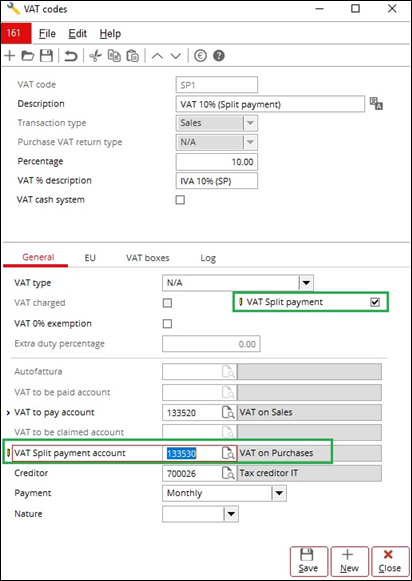
The VAT Split payment check box will
be enabled when the transaction type Sales has been selected and the
percentage that has been defined is not “0.00”. Once the check box has been
selected, it is mandatory to define the VAT Split payment account field.
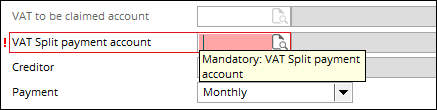
Once the VAT codes have been created, they
can be used for both single and multiple taxes.
Note: The
change of the selection at the VAT Split payment check box will only
affect new entries. The
existing entries will remain unaffected by the change.
Creation of write-off entries in the general journal
When saving the sales invoices with the
split payment VAT code, the write-off entries will be created as follows:
-
the write-off entries will be created in the first
general journal with the same currency code as the sales invoices, or
-
if there is no general journal with the same
currency code as the sales invoices, the system will create the write-off
entries in the general journal with the Variable currency option enabled.
If there is no matching general journal for
the write-off entries to be created in, the following message will be displayed
and the saving of the sales invoices will be cancelled:
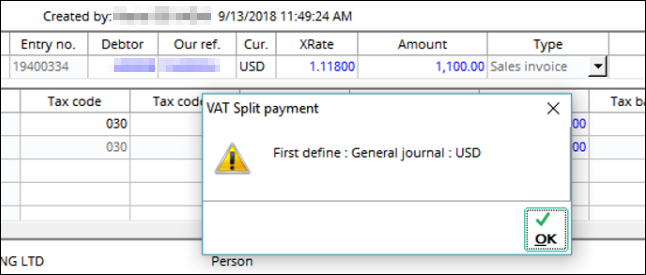
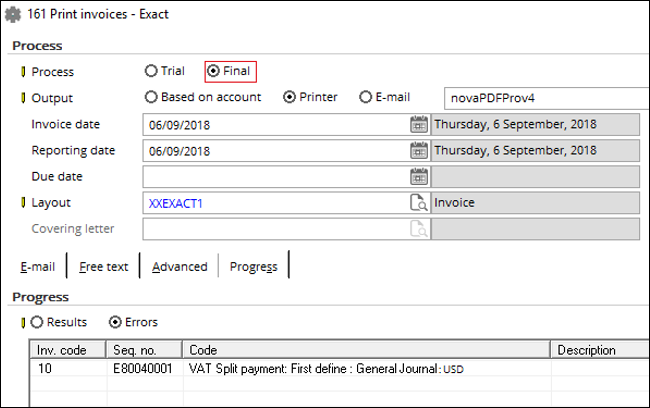
The message will also be displayed when
processing the entries in the Logistics module:
The write-off entries will have the same
our reference, date, reporting date and VAT fulfilment date as the sales
invoices, and will have the Processed status. The entries will be
grouped by the split payment VAT code and will use the general ledger that has
been defined as the VAT split payment account.
XML export and import for financial entries and
transactions
XML export
When exporting the financial entries
(accessible via XML ➔ Financial export ➔ Financial entries), only the sales entries will be exported as the
write-off entries will be processed automatically upon creation. When exporting
the transactions (accessible via XML ➔ Financial export ➔ Transactions), both the sales
and write-off entries will be exported.
XML import
When importing the financial entries
(accessible via XML ➔ Financial import ➔ Financial entries), the write-off entries will be created
automatically. When importing the transactions (accessible via XML ➔ Financial import ➔ Transactions) with the split
payment VAT code, the system will perform a validation process to identify the
write-off entries for the existing sales invoices. If no write-off entries are found
during the process, the write-off entries will then be created for the
transactions.
To avoid entry duplication when importing
the financial transactions, the general journal transactions must be imported
before the sales transactions. Once the sales transactions have been imported,
the corresponding write-off entries will then be automatically created. If
there are existing write-off entries, the automatic creation will not be
performed.
Editing, voiding, deleting, and unmatching sales invoices
and write-off entries
Editing sales invoices
When a sales invoice has been edited with
changes that affect the following fields, the write-off entry will be unmatched
from the sales invoice, voided, and recreated with the new changes:
-
Date
-
Reporting date
-
Fulfilment date
-
Currency code
-
Amount
-
Payment condition
-
VAT code
Voiding and deleting sales invoices
When a sales invoice has been voided or deleted,
the write-off entry linked to it will be voided as well. This behavior is also
applicable to the Select/Search and Matching screens.
Unmatching write-off entries from sales invoices
Unmatching the sales invoices manually will not void the write-off entries automatically. Thus, users will need to manually void the write-off entries.
Editing write-off entries
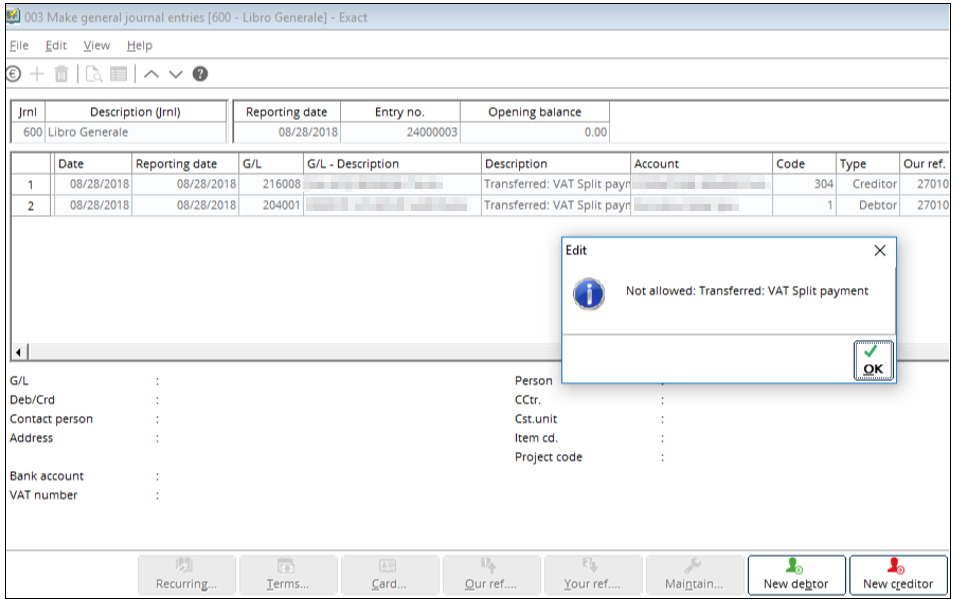
Editing is not allowed for the write-off
entries. The following message will be displayed when you attempt to edit a
write-off entry:
Voiding and deleting write-off entries
When a write-off entry has been voided, the
total amount will be reverted to the sales invoice. This behavior is also
applicable to the Select/Search and Matching screens.
Copying logic of the values for write-off entries based on
cost centres
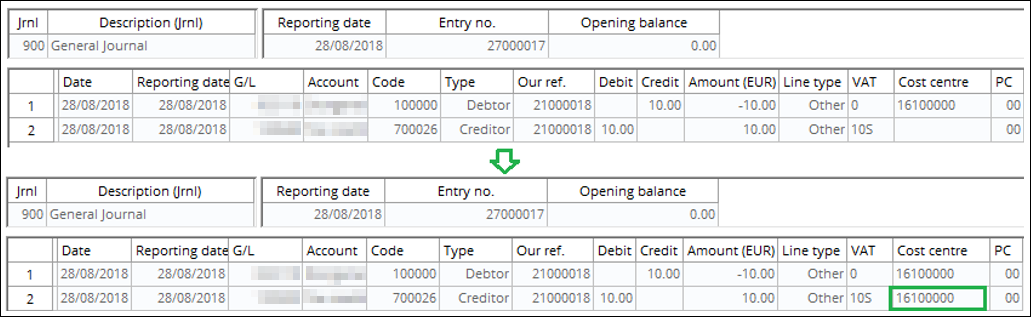
The value of a line with its cost centre
defined will be copied to the corresponding line for the write-off entries.
This behavior will be applied to the write-off entries whether the Enforce
balancing on cost centre setting has been enabled or not.
Analytical accounting
Via the enhancement, the VAT code field
will be blocked for editing in the sales invoices (with at least one split
payment VAT code) and write-off entries.
Note: This
limitation is only applicable to the single tax use. The existing limitation for
the other fields still applies to both single and multiple taxes.
Select/Search for sales invoices
Via the enhancement, the following fields will
be blocked for editing when the sales invoices are grouped by Our ref/Entry in
the Select/Search screen:
-
Date
-
Reporting date
-
Fulfilment date
Note: This
limitation is applicable to both the single and multiple taxes.
VAT register report
The write-off entries that have been created as part of the split payment will be excluded from the report. See the following report as an example:

VAT settlement report
In the VAT settlement report, the split
payment invoice amounts will be displayed at the Di cui soggetto ascissione
dei pagamenti field. The amounts are derived from the VAT codes with the
“S” label, which indicates that the VAT codes are split payment VAT codes and
from the VAT codes with the split payment option enabled.
Spesometro report
In the Spesometro report, the split payment
transactions will be indicated in the report by the <EsigibilitaIVA>
tag.
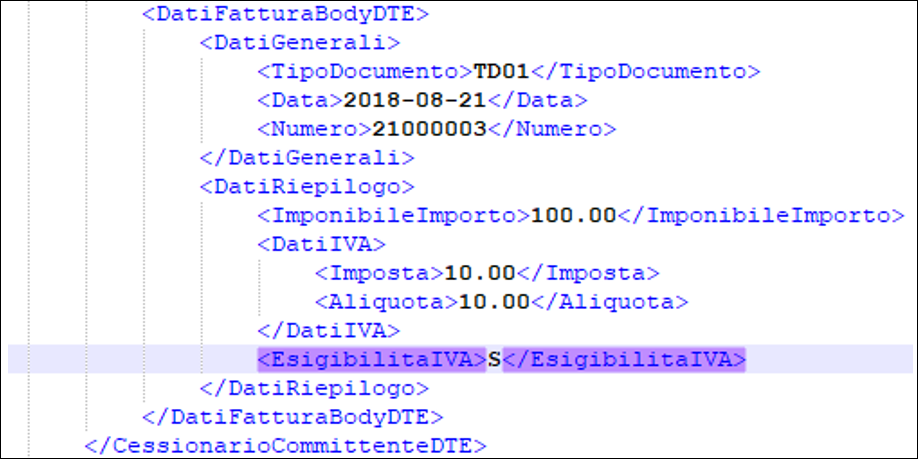
The following table lists the value that
will be displayed at the tag, based on the enabling of the VAT Split payment
option and the nature of payment that has been selected:
|
VAT Split payment
option
|
Nature of payment
|
Tag value
|
|
Enabled
|
Any
|
“S”
|
|
Disabled
|
“S”
|
“S”
|
|
Disabled
|
Other than “S”
|
The value that will be displayed will depend on the nature of payment that has been selected.
|
Note: The functionality is not applicable to the
entries that have been created in the bank or cash journal or the general journal.
These journals will not be able to use the split payment VAT codes that have
been created.
| Main Category: |
Attachments & notes |
Document Type: |
Release notes detail |
| Category: |
|
Security level: |
All - 0 |
| Sub category: |
|
Document ID: |
28.696.843 |
| Assortment: |
Exact Globe
|
Date: |
14-08-2019 |
| Release: |
|
Attachment: |
|
| Disclaimer |